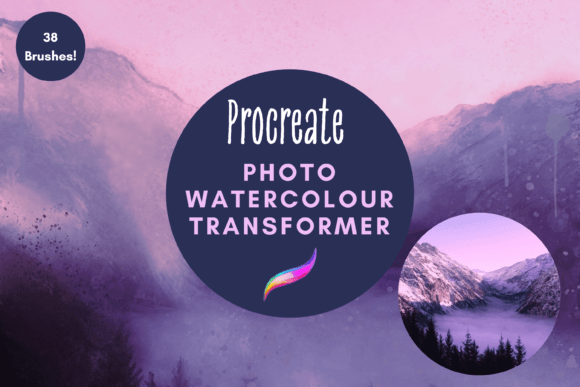
Transforming Photos into Art with the Photo Watercolour Transformer Procreate Brush Pack
Digital art has democratized creativity, allowing anyone with an iPad to produce stunning visuals without the mess of traditional media. However, achieving a specific aesthetic—like the soft, organic flow of watercolor—can still feel intimidating for beginners or time-consuming for professionals. This is where specialized tools like the Photo Watercolour Transformer Procreate brush pack become invaluable. It bridges the gap between photography and painting, offering a streamlined workflow for turning standard images into handcrafted-looking artworks.
This isn’t just about applying a filter. The pack contains 38 unique, hand-created digital brushes designed to mimic the unpredictable and beautiful nature of water-based paints. For creators, entrepreneurs, and hobbyists alike, understanding how to leverage these tools can significantly enhance both personal projects and commercial offerings.
What Makes This Brush Pack Different?
Many digital brush sets offer basic shapes, but the Photo Watercolour Transformer focuses on dynamic interaction. The included brushes are engineered for painting, blending, dripping, spattering, and edging. Because they are fully resizable and recolorable, they adapt to your specific vision rather than forcing you into a rigid template.
The core functionality allows you to import a photograph and manipulate it directly within the Procreate app. By layering these brushes over your image and experimenting with blend modes and gradient maps, you can soften harsh lines, add texture, and introduce the fluidity characteristic of traditional watercolor. The result is a gorgeous, painterly effect that retains the essence of the original photo while adding artistic depth.
Real-World Applications for Creators and Businesses
The versatility of this tool extends far beyond casual experimentation. Here is how different users can integrate these brushes into their workflows.
1. Greeting Card and Invitation Design
Small business owners who sell printed goods often struggle to create unique designs that stand out in a saturated market. Using the Photo Watercolour Transformer Procreate brushes, you can take simple product photos or stock imagery and transform them into bespoke artwork. Imagine a wedding invitation featuring a soft, watercolor version of the couple’s engagement photo, or a birthday card with a vibrant, painted backdrop. The ability to resize and recolor means you can match brand palettes or event themes precisely, adding a premium, handmade touch to digital files intended for print.
2. Scrapbooking and Digital Journaling
For hobbyists involved in digital scrapbooking, these brushes offer a way to elevate memory keeping. Instead of relying solely on pre-made clip art, you can turn travel photos into artistic vignettes. The spatter and drip effects add a sense of movement and nostalgia, making digital layouts feel more tactile and organic. This approach is particularly effective for creating themed pages, such as a summer vacation journal where beach photos are transformed into sun-drenched, washed-out paintings.
3. Wall Art and Home Decor
Entrepreneurs selling print-on-demand products can use this pack to create high-margin wall art. A landscape photograph, when processed through these watercolor brushes, can become a serene piece of decor suitable for modern interiors. The key here is experimentation with blend modes. By adjusting the opacity and layering techniques, you can achieve anything from a subtle hint of paint to a complete abstract transformation. This allows for the creation of cohesive collections, such as a series of floral prints or cityscapes, all sharing a consistent artistic style.
4. Educational and Content Creation Materials
Educators and bloggers can use these tools to create engaging visual content. A history teacher might transform historical photographs into softer, less distracting images for presentations, while a lifestyle blogger could create unique header images that align with a gentle, artistic brand identity. The process is quick enough to fit into a busy schedule yet produces results that look professionally curated.
Technical Requirements and Setup
Before purchasing or downloading, it is crucial to understand the technical ecosystem required. These files are digital brushes that only work within the Procreate App. This means you must have:
- An iPad (iPad Pro is recommended for optimal performance).
- The Procreate App installed.
- An Apple Pencil for precise control and pressure sensitivity.
Without this specific hardware and software combination, the brushes will not function. This is not a standalone program or a plugin for Photoshop; it is native to the Apple iPad environment.
Installation Process
For those new to digital assets, the installation process is straightforward but requires a few steps. Since these are instant downloads, you will need a platform to receive the files, such as iCloud or email. Once downloaded, you will likely receive a compressed ZIP file. You will need a program like iZip or the built-in Files app on iOS to unzip the contents.
After unzipping, you will find a Procreate-specific file. Tapping this file will automatically open Procreate and import the brushes into a named folder within your brush library. This organization helps keep your workspace tidy, allowing you to locate the watercolor tools quickly during your creative sessions.
Maximizing Your Results
To get the most out of the Photo Watercolour Transformer Procreate pack, consider these practical tips:
- Start with High-Quality Photos: The better the resolution and lighting of your original image, the more detailed and impressive the final watercolor effect will be.
- Experiment with Blend Modes: Don’t just paint on top. Try changing the layer blend mode to Multiply, Overlay, or Soft Light to see how the paint interacts with the underlying photo tones.
- Use Gradient Maps: As suggested in the product description, using gradient maps can drastically change the mood of the image. This allows you to shift a realistic photo into a monochromatic or duotone artistic piece with minimal effort.
- Layer Your Effects: Use the edger brushes to define shapes and the spatter brushes to add texture. Building up layers creates depth and prevents the image from looking flat or overly processed.
Is This Tool Right for You?
If you are looking for a one-click solution that requires no artistic input, this may not be the ideal choice. However, if you enjoy the process of digital crafting and want tools that respond to your touch, this pack is an excellent investment. It is perfect for DIY enthusiasts who want to create personalized gifts, small business owners looking to differentiate their product lines, and digital artists seeking to expand their textural vocabulary.
The value lies in the flexibility. Whether you are designing a single greeting card or building a portfolio of printable wall art, the Photo Watercolour Transformer Procreate brushes provide the foundational elements needed to achieve a professional, hand-painted look. By combining technology with traditional artistic aesthetics, you can create works that resonate emotionally with viewers, whether they are seeing them on a screen or holding them as printed goods.
Ultimately, these brushes empower you to see your photographs not just as records of reality, but as canvases for interpretation. With practice, you will develop a signature style that leverages the unique capabilities of digital watercolor, opening up new avenues for creative expression and commercial opportunity.