Evaluating Procreate Halloween Seamless Pattern Brushes for Digital Design
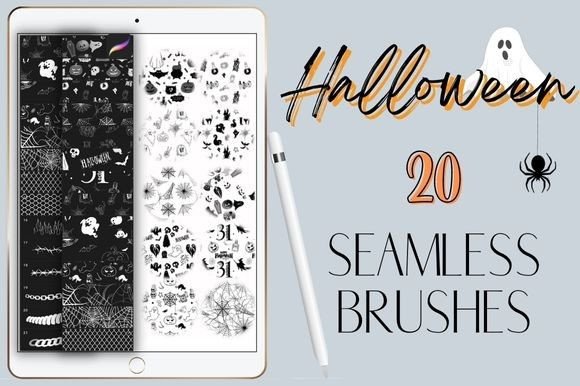
The demand for efficient, high-quality digital assets continues to grow among illustrators and graphic designers, particularly during seasonal peaks like October. For artists working within the iPad ecosystem, the Procreate Halloween Seamless Pattern represents a specialized toolset designed to streamline the creation of repeating motifs. This collection typically includes twenty hand-drawn brushes that allow users to generate spooky textures, backgrounds, and decorative elements with minimal manual effort. Understanding the functionality, limitations, and ideal use cases for these digital tools is essential for determining whether they align with your specific workflow and creative objectives.
Understanding the Toolset
At its core, this product is a compilation of twenty distinct brush files packaged in a single ZIP archive. These are not standalone images or static stamps; they are dynamic brush engines configured specifically for the Procreate application. The primary feature of these brushes is their ability to create seamless patterns. When applied to the canvas, the brush stroke repeats the underlying graphic element continuously, allowing for the rapid generation of wallpaper-style backgrounds, fabric prints, or wrapping paper designs.
The "hand-drawn" aspect implies that the source artwork for each pattern possesses an organic, artistic quality rather than a rigid, vector-based geometric perfection. This aesthetic is often preferred in illustration for its warmth and character. Because the brushes are digital files, they do not require physical shipping or inventory management. Upon purchase, the user receives a downloadable file that must be imported directly into the Procreate app on an iPad.
Key Benefits and Workflow Efficiency
The most significant advantage of using a Procreate Halloween Seamless Pattern set is time efficiency. Creating a seamless pattern from scratch involves complex steps: drawing the initial motif, offsetting the canvas, filling in the gaps, and testing the repeat for visible seams. Pre-configured brushes bypass this technical hurdle. Artists can focus entirely on composition and color theory rather than the mechanical process of pattern construction.
Another critical benefit is flexibility. As noted in the product specifications, these brushes can be used with any color. In Procreate, the brush engine respects the currently selected foreground color. This means a single pumpkin-pattern brush can be rendered in traditional orange, monochromatic black, or pastel pink, depending on the project's needs. This versatility reduces the need for multiple variations of the same asset, keeping the library lean and manageable.
Furthermore, the ability to adjust the scale of the pattern provides additional control. By navigating to the Brush Settings and adjusting the "Grain" > "Scale" parameter, users can increase or decrease the size of the repeating element. This feature allows a single brush to serve multiple purposes, from fine, subtle textures to bold, statement backgrounds.
Technical Requirements and Limitations
Before acquiring these brushes, it is crucial to understand the technical constraints. These are digital brushes designed exclusively for the Procreate app on iPad. They will not function in Adobe Photoshop, Clip Studio Paint, Affinity Designer, or any desktop-based software. Additionally, they require an input device that supports pressure sensitivity, such as the Apple Pencil or a compatible third-party stylus. Users attempting to use these brushes with finger touch inputs may find the experience limited, as many brush dynamics rely on pressure data to render correctly.
Another consideration is the learning curve associated with brush settings. While the brushes work out of the box, achieving the desired result often requires tweaking. For instance, if the pattern appears too dense or too sparse, the user must manually adjust the grain scale. Some users may find this level of customization empowering, while others seeking a "one-click" solution might perceive it as an extra step. It is also important to note that because these are raster-based brushes, scaling them up significantly beyond their original resolution may result in pixelation, depending on the canvas size and DPI settings.
Ideal Use Cases
This toolset is a strong fit for several specific scenarios. First, it is highly valuable for surface pattern designers who need to produce holiday-themed collections quickly. Whether designing for print-on-demand services, textile printing, or stationery, the seamless nature of the brushes ensures that the final output tiles correctly without visible breaks.
Social media content creators also benefit from these assets. During the Halloween season, engagement often spikes for themed content. Using these brushes, creators can rapidly generate branded backgrounds for Instagram stories, Pinterest pins, or YouTube thumbnails. The ability to change colors instantly allows for consistent branding across different posts while maintaining a festive theme.
Digital planners and journal enthusiasts represent another key audience. Many users customize their digital planners in Procreate. These brushes allow for the creation of unique, themed pages for October, adding a personal touch that pre-made clipart cannot easily replicate due to the seamless integration with the drawing workflow.
When to Consider Alternatives
While useful, these brushes are not a universal solution. If your primary work involves vector graphics, such as logo design or scalable illustrations for large-format printing, raster-based Procreate brushes may not be suitable. In such cases, vector pattern libraries compatible with Adobe Illustrator or Affinity Designer would be a more appropriate choice, as they offer infinite scalability without quality loss.
Additionally, if you do not own an iPad or do not use Procreate, this product holds no value. There are numerous alternative marketplaces offering seamless patterns in PNG or JPG format, which can be used in any software. While these static images lack the dynamic coloring and scaling benefits of Procreate brushes, they offer broader compatibility. For artists who prefer complete control over every element of a pattern and enjoy the technical challenge of building repeats from scratch, purchasing pre-made brushes may feel restrictive or unnecessary.
Making an Informed Decision
Choosing whether to invest in a Procreate Halloween Seamless Pattern bundle depends on your existing workflow and project goals. If you are already embedded in the Procreate ecosystem and frequently create seasonal content, these brushes offer a high return on investment through time savings and creative flexibility. The ability to recolor and resize patterns dynamically is a significant advantage over static image files.
However, if you are a casual user who only creates Halloween art once a year, the cost may outweigh the benefits compared to using free resources or simple stamp brushes. Evaluate your current toolkit: do you struggle with creating seamless repeats? Do you need faster turnaround times for holiday projects? If the answer is yes, this toolset addresses those pain points effectively. If you primarily work in vector environments or do not use an iPad, exploring alternative formats or software-specific plugins would be a more logical path.
Ultimately, these twenty hand-drawn brushes serve as a specialized utility for a specific niche. They bridge the gap between artistic expression and technical pattern-making, allowing designers to focus on creativity rather than mechanics. By understanding the compatibility requirements and leveraging the customization options like grain scaling, users can maximize the utility of this digital asset in their seasonal design projects.