Mastering the Art of Digital Texture: A Comprehensive Guide to Mixed Media Brushes
In the evolving landscape of digital illustration and graphic design, the quest for authenticity often leads creators away from sterile, vector-perfect lines toward the rich, tactile world of texture. The integration of organic imperfections into digital workflows is no longer a niche aesthetic choice but a fundamental requirement for designers seeking to evoke emotion, nostalgia, and depth. At the heart of this transformation lies the versatile Textured Brush, a tool that bridges the gap between traditional craftsmanship and modern digital efficiency. By leveraging a compilation of mixed textured art brushes, artists can replicate the nuanced behaviors of physical media, from the rough grain of lino cuts to the fluid dynamics of water ripples.
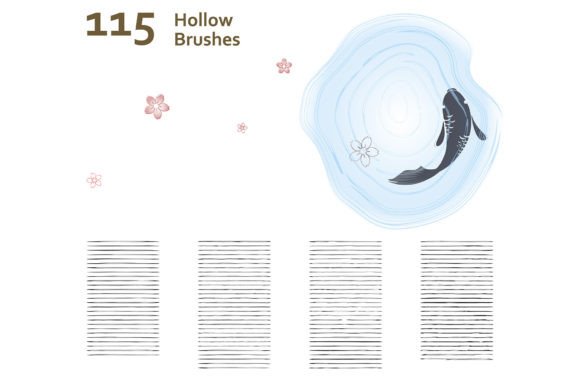
This extensive collection serves as a robust toolkit for professionals and hobbyists alike, offering a diverse array of assets designed to enhance frame borders, outlines, shadow shading, and surface details. With compatibility extending back to Adobe Illustrator CS6 and above, these resources ensure that legacy projects and contemporary designs alike can benefit from high-quality, scalable vector textures. The set includes 115 hollow brushes, 43 sketch brushes, and 103 wooden brushes, all formatted in AI and EPS files, providing a comprehensive solution for creating retro vintage, engraved, and hatching effects.
The Renaissance of Retro and Vintage Aesthetics in Digital Design
The resurgence of retro and vintage styles in contemporary branding and illustration is driven by a consumer desire for authenticity and heritage. In an era dominated by flat design and minimalism, textured elements provide a sensory counterpoint that engages viewers on a deeper level. A Textured Brush allows designers to infuse their work with the character of aged paper, weathered wood, or hand-engraved metal without the time-consuming process of manual creation. This capability is particularly valuable in industries such as packaging design, book covers, and apparel graphics, where tactile appeal can significantly influence purchasing decisions.
Consider the application of engraved and hatching techniques. Traditionally, these methods required meticulous hand-work using burins or etching needles. Today, digital equivalents enable artists to apply complex cross-hatching patterns instantly, maintaining the visual weight and shadow depth characteristic of classical engraving. This not only accelerates the production timeline but also allows for non-destructive editing, enabling designers to experiment with density and direction until the desired vintage effect is achieved. The ability to simulate these historical printing techniques adds a layer of sophistication and perceived value to modern digital assets.
Diverse Brush Categories and Their Specific Applications
Understanding the specific utility of each brush category within a mixed texture compilation is essential for maximizing creative potential. The division into hollow, sketch, and wooden brushes reflects the varied needs of different design scenarios, from structural framing to organic detailing.
Hollow Brushes for Structural Framing and Outlines
The 115 hollow brushes included in this set are primarily designed for creating frame borders and distinct outlines. Unlike solid strokes, hollow brushes offer a transparent center with textured edges, making them ideal for framing content without obscuring underlying imagery. These brushes are particularly effective in poster design and editorial layouts, where they can define sections or highlight key information with a decorative, yet unobtrusive, border. The variety within this category ensures that designers can match the frame style to the overall theme, whether it be a delicate, rippled edge for a romantic motif or a rugged, irregular outline for an industrial look.
Sketch Brushes for Organic Shading and Detailing
With 43 sketch brushes available, artists have access to tools that mimic the spontaneous, expressive quality of pencil or charcoal drawings. These brushes are indispensable for adding shadow shading and subtle textural variations to illustrations. They allow for the creation of soft gradients and rough transitions that break up the uniformity of digital colors. For character designers and concept artists, sketch brushes provide the necessary flexibility to iterate quickly on forms and lighting, capturing the essence of a subject with loose, energetic strokes that convey movement and life.
Wooden Brushes for Natural Surface Simulation
The 103 wooden brushes offer a specialized solution for replicating the complex grain patterns and imperfections of timber. These assets are crucial for environmental illustrators and product designers who need to depict natural materials accurately. From the smooth, polished finish of hardwood furniture to the rough, splintered texture of aged driftwood, these brushes provide a realistic foundation for digital paintings. When combined with other textured elements, such as water effects or ripple surfaces, wooden brushes help create cohesive scenes that feel grounded in reality.
Enhancing Visual Depth with Water Effects and Ripple Surfaces
Beyond static textures, the inclusion of water effect and ripple surface brushes introduces dynamic elements to digital compositions. These tools are essential for depicting fluidity and reflection, adding a sense of motion and atmosphere to otherwise static images. Whether illustrating a serene lake scene or designing a label for a beverage brand, the ability to render convincing water textures enhances the visual narrative. The interplay between light and surface tension, captured through these specialized brushes, creates a lifelike quality that resonates with viewers.
Furthermore, the integration of lino cut styles alongside water effects offers a unique juxtaposition of rigid, carved lines and fluid, organic shapes. This contrast can be used to create striking visual metaphors or to highlight specific elements within a composition. For instance, a lino cut-style border might frame a central image featuring soft, rippling water, drawing the eye inward while maintaining a cohesive artistic theme. Such combinations demonstrate the versatility of a comprehensive Textured Brush library, allowing for endless creative experimentation.
Technical Compatibility and Workflow Integration
One of the most significant advantages of this brush compilation is its broad compatibility with Adobe Illustrator CS6 and above. This ensures that users across various versions of the software can seamlessly integrate these assets into their existing workflows. The availability of both AI and EPS formats provides flexibility in how the brushes are utilized. AI files allow for direct installation and immediate use within the Illustrator interface, while EPS files offer compatibility with other vector-based applications, facilitating collaboration across different platforms and teams.
For professionals working in large-scale production environments, the scalability of vector textures is a critical factor. Unlike raster images, which lose quality when enlarged, vector brushes maintain crisp edges and consistent detail at any size. This makes them ideal for projects ranging from small business cards to large-format billboards. Additionally, the editable nature of vector paths allows designers to customize individual brush strokes, adjusting weights, colors, and shapes to fit specific project requirements. This level of control ensures that the final output aligns perfectly with the designer's vision, without compromising on quality or resolution.
Practical Considerations for Effective Texture Usage
While the availability of high-quality textured brushes is a powerful asset, their effective use requires a thoughtful approach. Overloading a design with too many competing textures can result in visual clutter and reduced readability. It is essential to establish a hierarchy of textures, using them strategically to guide the viewer's eye and emphasize key elements. For example, a subtle hatching pattern might be used for background shading, while a more pronounced wooden texture could be reserved for primary focal points.
Additionally, understanding the context in which textures are applied is crucial. A retro vintage aesthetic may call for heavy use of engraved and distressed effects, whereas a modern minimalist design might benefit from sparing application of subtle grain or water ripples. Designers should consider the emotional tone they wish to convey and select textures that support that narrative. Testing different combinations and observing how they interact with color palettes and typography can help refine the overall composition, ensuring a harmonious and impactful final result.
In conclusion, the strategic implementation of a diverse Textured Brush collection empowers creators to transcend the limitations of digital media, infusing their work with the warmth and complexity of traditional art forms. By mastering the use of hollow, sketch, and wooden brushes, along with specialized effects like water ripples and lino cuts, designers can produce compelling, authentic visuals that resonate with audiences across various industries. As the demand for distinctive, high-quality design continues to grow, these tools remain indispensable for anyone seeking to elevate their creative output.