Mastering Digital Portraiture: A Guide to Hair Stamps for Procreate Palettes
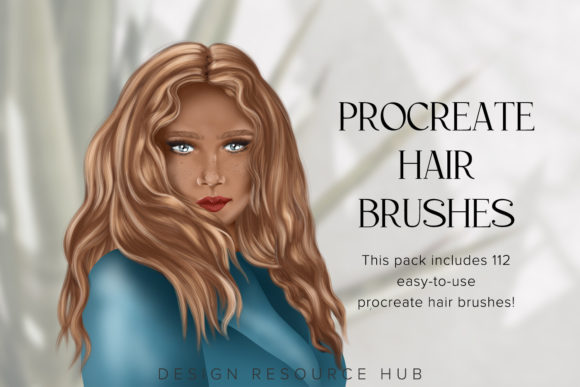
In the rapidly evolving world of digital art, efficiency is just as valuable as technical skill. For artists using the iPad and Procreate, the demand for tools that streamline complex processes has never been higher. One of the most time-consuming aspects of portrait illustration is rendering hair. It requires a delicate balance of flow, texture, and lighting. This is where Hair Stamps for Procreate Palettes come into play. These specialized brushes are designed to transform a tedious task into a swift, enjoyable process, allowing creators to focus on composition and expression rather than getting lost in individual strands.
This article explores the significance of these digital assets, how they function within the Procreate ecosystem, and why they are becoming an essential tool for both beginners and seasoned illustrators. By understanding the mechanics behind these stamps and the accompanying color palettes, artists can elevate their workflow and produce high-quality, 300 DPI illustrations with remarkable speed.
The Challenge of Digital Hair Rendering
Before diving into the solution, it is important to understand the problem. Drawing hair digitally is notoriously difficult. Unlike solid objects, hair is semi-translucent, reflective, and composed of thousands of individual fibers that move in cohesive groups. Traditional painting methods often involve layering hundreds of strokes to achieve a realistic look. This can lead to "over-working" the image, where the hair loses its natural flow and appears stiff or muddy.
For many artists, this bottleneck slows down production significantly. Whether you are creating character designs for games, illustrations for books, or social media content, time is a critical resource. Hair Stamps for Procreate address this by providing pre-rendered, high-quality textures that mimic the natural behavior of hair. Instead of painting every strand, you apply a stamp that already contains the necessary depth, shadow, and highlight information.
What Are Hair Stamps and Color Palettes?
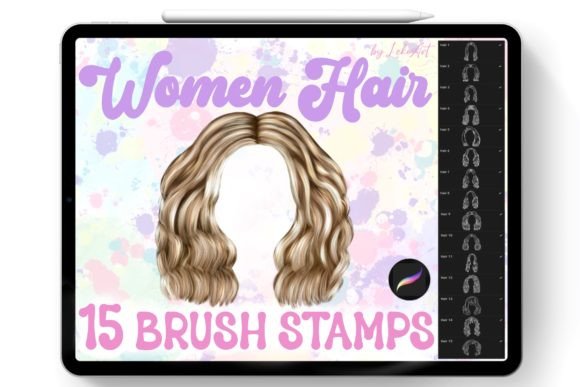
The product known as 15 Hair Stamps for Procreate is a curated collection of brush assets specifically engineered for portrait painting. These are not simple shapes; they are sophisticated digital brushes that react dynamically to the user’s input. When combined with ready-made color palettes, they offer a complete system for generating cool, professional-looking illustrations quickly.
The Role of Ready-Made Color Palettes
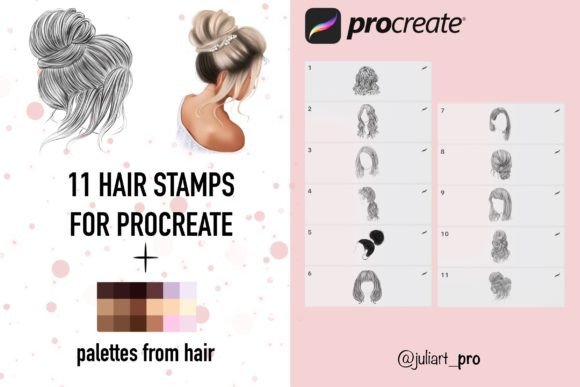
Color theory is another hurdle for many digital artists. Choosing the right shades for highlights, mid-tones, and shadows can be tricky, especially when dealing with the complex reflections found in hair. The included 3 Palettes from Hair solve this by providing pre-selected color groups that harmonize perfectly with the stamp brushes. This ensures that every stroke you make contributes to a cohesive look, reducing the guesswork involved in shading and lighting.
Technical Specifications and Quality
One of the primary concerns when purchasing digital assets is quality. Low-resolution brushes can pixelate when scaled, ruining the integrity of a print-ready piece. These hair stamps are crafted at a high quality 300 DPI (dots per inch). This resolution is the industry standard for professional printing and high-definition digital displays. It ensures that your illustrations remain crisp and detailed, whether viewed on a smartphone screen or printed in a large-format art book.
The collection includes Brushes Hair 1-11, offering a variety of textures and styles. From straight, sleek locks to curly, voluminous waves, this variety allows artists to depict diverse characters and styles without needing to create custom brushes from scratch.
Compatibility and Hardware Requirements
It is crucial to note the specific hardware requirements for these tools to function correctly. These brushes are designed exclusively for the iPad running the Procreate application. They rely heavily on the advanced pressure-sensing technology of the Apple Pencil.
- Device: iPad ONLY.
- Stylus: Apple Pencil is required.
- Software: Procreate app.
Why is the Apple Pencil essential? The brushes are programmed to react to the pressure of the Apple Pencil. When you press harder, the stroke may become denser or darker; when you lighten your touch, the stroke becomes finer or more transparent. This dynamic response mimics the behavior of traditional media like charcoal or watercolor. Without the Apple Pencil’s pressure sensitivity, the brushes cannot deliver their intended effect.
Note: These brushes are not suitable for other programs and applications. Attempting to use them in Photoshop, Clip Studio Paint, or other software will likely result in errors or a complete lack of functionality, as the file format is specific to Procreate’s engine.
Step-by-Step Installation Guide
For those new to importing custom brushes, the process might seem daunting. However, the developers have streamlined the installation to be as user-friendly as possible. Follow these steps to get started:
- Make a Purchase: Acquire the digital file from the marketplace or vendor.
- Download the File: Save the compressed folder (usually a .zip file) to your iPad’s Files app or a cloud storage service accessible from your iPad.
- Unpack the Archive: Locate the downloaded file and click “Unpack” or “Extract.” This will reveal the individual brush files and palette files contained within.
- Select the Files: Choose the specific files you wish to install. You can select all of them or pick specific brushes from the Hair 1-11 set.
- Export to Procreate: Tap the share icon and select Procreate from the list of apps. The brushes and palettes will automatically import into your Procreate library, ready for immediate use.
Practical Applications in Modern Creativity
The integration of tools like Hair Stamps fits seamlessly into modern creative workflows. In today’s fast-paced digital economy, content creators, freelance illustrators, and hobbyists alike need to produce high-volume work without sacrificing quality. These stamps are not just "shortcuts"; they are productivity enhancers.
Consider a concept artist working on a character design sheet. They need to visualize how a character looks with five different hairstyles. Using traditional painting methods, this could take hours. With Hair Stamps, the artist can iterate through these variations in minutes, allowing for faster client feedback and quicker project turnaround. Similarly, educators teaching digital art can use these tools to help students understand the structure of hair without getting bogged down in the technical difficulties of brush creation.
Common Misunderstandings
A common assumption is that using stamp brushes constitutes "cheating" or lacks artistic merit. This is a misconception. Professional artists have always used tools to aid their vision, from pre-mixed paints to photographic references. The value lies in how the tool is used. These stamps provide a foundation, but the artist still controls the placement, color adjustment, and blending. The result is a collaborative effort between the artist’s vision and the tool’s efficiency.
Another misunderstanding is that these brushes are one-size-fits-all. While they are versatile, they require customization. Artists are encouraged to adjust the hue, saturation, and brightness of the stamps to match the specific lighting conditions of their illustration. The included palettes serve as a starting point, but creative manipulation is key to achieving a unique style.
Maximizing Your Workflow
To get the most out of your 15 Hair Stamps for Procreate, consider the following tips:
- Layer Management: Use separate layers for different sections of hair. This allows you to adjust the opacity and blending modes of specific stamps without affecting the entire hairstyle.
- Color Harmony: Utilize the included palettes to ensure your highlights and shadows complement the skin tones and background of your portrait.
- Pressure Control: Practice varying your pressure with the Apple Pencil. Light touches can create soft, flyaway hairs, while firm presses can define the main bulk of the hairstyle.
- Combination Techniques: Do not rely solely on stamps. Combine them with manual brushing to add stray hairs and fine details, enhancing the realism of the final piece.
Conclusion
Hair Stamps for Procreate Palettes represent a significant advancement in digital illustration tools. By combining high-quality 300 DPI assets with intuitive pressure-sensitive technology, they empower artists to create stunning portraits with greater ease and speed. Whether you are a beginner looking to overcome the challenges of drawing hair or a professional seeking to optimize your workflow, these brushes offer a practical, efficient solution.
Remember, the key to mastering these tools lies in understanding their limitations and strengths. They are designed specifically for the iPad and Apple Pencil within the Procreate environment. By following the simple installation instructions and experimenting with the included palettes, you can unlock new levels of creativity in your digital art journey. Embrace these tools not as replacements for skill, but as catalysts for your artistic expression.