Mastering the Berries Procreate Brush Stamps Set for Flawless Digital Illustrations
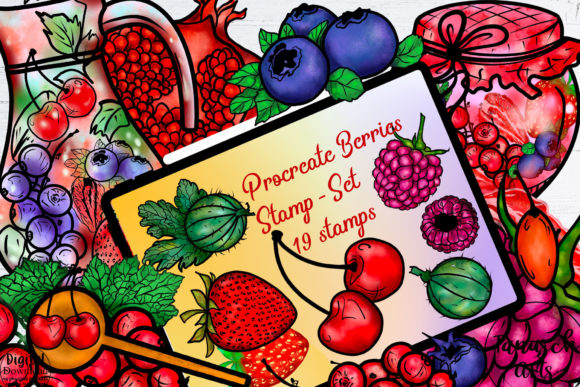
Digital illustration has evolved rapidly, shifting from complex vector paths to intuitive, texture-rich workflows. For artists using the iPad, the Berries Procreate Brush Stamps Set represents a significant leap in efficiency and aesthetic quality. This collection, specifically the "TanuschBerries" instant download file, offers nineteen distinct stamps designed to streamline the creation of organic, botanical, and textured elements. However, possessing high-quality assets is only half the battle. Many creators stumble not because the tools are inadequate, but because they misunderstand the technical ecosystem required to use them effectively.
Before you invest time or money into expanding your digital toolkit, it is crucial to understand the specific constraints and capabilities of this product. The difference between a frustrating experience and a seamless workflow often lies in the details of compatibility, installation, and application strategy.
The Critical Compatibility Misunderstanding
The most common and costly mistake users make involves platform compatibility. It is essential to clarify immediately: this file is exclusively for Procreate on the iPad. You cannot use the Berries Procreate Stamp Brushes Set in Photoshop, Illustrator, Clip Studio Paint, or any desktop-based software. Attempting to import these files into non-Procreate environments will result in errors, wasted time, and unnecessary frustration.
This limitation exists because Procreate uses a proprietary brush engine format that differs significantly from standard image files or vector paths. When buyers overlook this detail, they often assume that a "brush set" is a universal asset. In reality, digital brushes are highly specialized. If your primary workflow relies on desktop applications, this specific product will not serve your needs. Always verify your software environment before purchasing. For iPad-only artists, however, this set integrates natively, offering immediate access to its features without conversion hassles.
Navigating the Etsy Download Process Correctly
Even after confirming compatibility, many users encounter hurdles during the acquisition phase. A frequent oversight occurs when downloading files directly through the Etsy mobile app. While convenient, the app’s internal browser can sometimes mishandle large or specialized file types, leading to corrupted downloads or invisible files. This is not a defect in the brush set itself, but a limitation of the third-party app’s file handling.
To avoid this, adopt a more reliable download method. If you experience issues with the Etsy app, switch to Safari or another dedicated web browser on your iPad. Log in to your Etsy account via the browser, locate your purchase, and initiate the download there. This approach ensures the file is retrieved correctly and stored in a location accessible to your operating system. Once downloaded, look for the download arrow at the top right of the browser bar. Clicking this reveals your recent downloads, allowing you to select the brush set file directly. Procreate is designed to recognize this file type instantly, importing it into your brush library without additional steps. Understanding this technical nuance saves hours of troubleshooting.
Optimizing Workflow with Stamp Brushes
Once installed, another common pitfall is underutilizing the potential of stamp brushes. Some artists treat stamps as static clip-art, placing them rigidly without adjustment. This approach can make illustrations feel repetitive and artificial. The Berries Procreate Brush Stamps Set is designed to be dynamic. Each of the nineteen stamps can be manipulated using Procreate’s built-in transform tools.
To achieve natural results, vary the size, rotation, and opacity of each stamp. Use the hue and saturation adjustments to shift colors subtly, ensuring that no two berries or leaves look identical. This technique mimics the randomness found in nature, adding depth and realism to your compositions. Additionally, consider layering stamps. Placing a lighter, semi-transparent stamp over a darker one can create complex textures that single strokes cannot achieve. By treating these stamps as building blocks rather than final elements, you unlock their full creative potential.
Evaluating Quality and Usability Before Purchase
When considering any digital asset, including the TanuschBerries set, evaluate its relevance to your current projects. Ask yourself: Do I frequently illustrate botanical themes? Do I need quick textural elements for background designs? If your work is primarily geometric or architectural, these organic stamps may sit unused. Aligning your purchases with your actual output prevents clutter in your brush library and ensures a better return on investment.
Furthermore, check the resolution and scalability of the stamps. High-quality Procreate brushes should maintain clarity when scaled up. Poorly constructed brushes become pixelated or blurry, degrading the professional appearance of your work. The Berries set is crafted to retain sharpness, but it is wise to test this within the free trial period if available, or by reviewing sample images provided by the creator. Look for clean edges and consistent texture distribution. These indicators reflect the craftsmanship behind the brush engine settings.
Best Practices for Installation and Organization
Proper organization enhances usability. Upon importing the Berries Procreate Stamp Brushes Set, it will appear in your brush collection. To maintain an efficient workflow, create a dedicated folder for botanical or seasonal assets. Drag the new brushes into this folder immediately. This simple step prevents your library from becoming disorganized, allowing you to locate specific tools quickly during intense creative sessions.
Additionally, familiarize yourself with Procreate’s gesture controls. Knowing how to undo, redo, and adjust brush size swiftly allows you to experiment with the stamps without breaking your flow. Practice applying the stamps on a separate layer before committing them to your main artwork. This non-destructive approach gives you the freedom to move, resize, or delete elements without affecting the underlying illustration.
Making an Informed Decision
Choosing the right digital tools requires a balance of technical awareness and artistic intent. The Berries Procreate Brush Stamps Set offers a specialized solution for iPad artists seeking efficient, high-quality botanical elements. By understanding its exclusive compatibility with Procreate, mastering the correct download procedures via Safari, and employing dynamic styling techniques, you can avoid common pitfalls and elevate your digital art.
Remember, the value of any brush set lies in how well it integrates into your unique workflow. Take the time to assess your needs, ensure your technical setup is correct, and practice with intention. With the right approach, these nineteen stamps can become indispensable components of your creative arsenal, enhancing both the speed and quality of your illustrations. Thank you for your interest in refining your digital artistry, and we hope this guidance helps you make the most of your tools.