Watercolor Strokes for Procreate: Integrating Organic Textures into Professional Design Workflows
In the evolving landscape of digital illustration and graphic design, the demand for authentic, hand-crafted aesthetics has never been higher. Clients across branding, packaging, and editorial sectors are increasingly seeking visuals that feel tactile and human, moving away from the sterile precision of vector-only graphics. This is where Watercolor Strokes for Procreate becomes an essential asset in a designer’s toolkit. By bridging the gap between traditional media fluidity and digital efficiency, this brush set allows creators to inject organic warmth into their projects without the unpredictability and mess of physical paints.
For professionals ranging from freelance illustrators to small business owners managing their own marketing materials, understanding how to integrate these tools into a broader workflow is key to maximizing their value. It is not merely about having a new brush; it is about streamlining the process of creating high-quality, textured assets that elevate brand identity and visual communication.
The Role of Digital Watercolor in Modern Design Processes
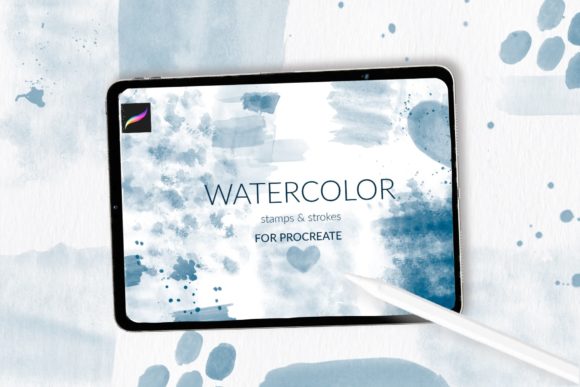
Watercolor effects have long been associated with wedding invitations, greeting cards, and fine art. However, their application has expanded significantly. In contemporary design workflows, watercolor textures serve as foundational elements for background creation, decorative accents, and complex layering techniques. The Watercolor strokes and stamps for Procreate collection is specifically engineered to support this versatility. It includes 31 stamp brushes featuring diverse strokes and textures, three specialized watercolor splash stamp brushes, and one unique watercolor cotton paper pattern brush designed for seamless background generation.
Integrating these elements early in the design phase can drastically reduce production time. Instead of spending hours scanning physical paintings or searching for stock images with inconsistent lighting and resolution, designers can generate custom textures on demand. This immediacy allows for rapid iteration during the conceptual stage. Whether you are mocking up a product label or designing a social media campaign, having immediate access to high-fidelity watercolor assets enables you to test color palettes and compositions quickly, ensuring that the final output aligns with the client’s vision before committing to detailed refinement.
Workflow Integration: From Concept to Final Export
To fully leverage the potential of this brush set, it is helpful to view it as part of a structured creative pipeline. The process typically involves preparation, execution, and refinement. Here is how Watercolor Strokes for Procreate fits into each stage:
Preparation and Setup
Before beginning any project, ensuring your digital environment is optimized is crucial. This brush set is exclusive to iPad Procreate, meaning your hardware and software must be compatible. The set is delivered as a single .brushset file containing 34 brushes. For users running Procreate version 5.0 or later, installation is straightforward. However, for those on older systems, specific steps are required to ensure functionality.
If you are using Procreate version 4.0 or earlier, the .brushset format is not supported. In this case, you must request individual .brush files from the creator via email. This distinction highlights the importance of checking software versions before purchasing digital assets. Once you have the correct file format, organizing your brush library is the next step. Creating a dedicated folder within Procreate for "Textures" or "Watercolor Assets" ensures that these tools are easily accessible during intense work sessions, reducing context switching and maintaining creative flow.
Execution: Building Layers and Depth
The core strength of this set lies in its variety. The 31 stamp brushes offer different strokes and textures, allowing for nuanced expression. When creating a background for a branding project, start with the watercolor cotton paper pattern brush. This provides a subtle, realistic substrate that mimics traditional art paper, adding immediate depth to the canvas.
Next, utilize the three watercolor splash stamp brushes to introduce dynamic elements. These are particularly effective for creating focal points or breaking up rigid geometric layouts common in corporate design. By varying the opacity and size of these stamps, you can achieve a look that ranges from bold and expressive to soft and understated. The key here is layering. Digital watercolor thrives on the interaction between layers. Use multiply blending modes to allow colors to interact naturally, simulating the way pigments bleed and settle on real paper.
For decorative shapes in packaging design, the individual stroke stamps can be combined to form custom borders or frames. This approach offers greater consistency than hand-painting each element while retaining the organic imperfections that make watercolor appealing. This balance between control and randomness is what makes the set valuable for professional applications where brand guidelines require consistency, but the aesthetic demands authenticity.
Refinement and Quality Control
After the initial composition is established, the refinement phase begins. This is where attention to detail separates amateur work from professional deliverables. Check the resolution of your canvas, especially if the final output is intended for print, such as wedding invitations or sublimation designs. Procreate allows for high-resolution canvases, which is essential for maintaining the crispness of the watercolor edges when scaled.
Use the adjustment tools in Procreate to fine-tune hue, saturation, and brightness. Since the brushes are digital, you have the advantage of non-destructive editing. If a particular splash feels too dominant, you can mask it or lower its opacity without repainting. This flexibility supports a more experimental workflow, encouraging designers to push creative boundaries without the fear of ruining the piece.
Practical Applications Across Industries
The versatility of Watercolor Strokes for Procreate makes it suitable for a wide array of industries. For marketers and entrepreneurs, these brushes are invaluable for creating eye-catching social media graphics that stand out in crowded feeds. The organic nature of watercolor draws the eye and conveys a sense of approachability and creativity, which can enhance brand perception.
In the realm of publishing and education, these tools can be used to create engaging illustrations for children’s books or educational materials. The soft textures are gentle on the eyes and can help in creating a calming learning environment. For freelancers specializing in wedding stationery, the ability to quickly generate custom floral backgrounds or abstract washes can significantly increase throughput, allowing them to take on more clients without sacrificing quality.
Sublimation design is another area where this set excels. The high-resolution textures translate well onto fabrics and hard surfaces, provided the initial canvas setup is correct. Designers can create seamless patterns using the paper texture brush and overlay vibrant watercolor splashes to produce unique prints for apparel or home decor items.
Installation Guide for Optimal Performance
Proper installation ensures that the brushes function as intended. For most users with updated software, the process is simple:
- Download the
.brushsetfile to your iPad. - Tap on the file in your Files app.
- Select "Open in Procreate."
- The brushes will automatically import into your current brush library.
For users with older iPads or Procreate version 4.0 or earlier, the process requires manual handling of individual files:
- Download the folder containing individual
.brushfiles to your iPad. - Open the folder and select a
.brushfile. - Tap and hold the file with your finger or Apple Pencil.
- Choose "Share" from the menu.
- If "Open in Procreate" is not visible, click "More," scroll to find it, and select it.
- Repeat this process for each brush, or contact the creator to request a compatible format if available.
Once installed, test the brushes on a blank canvas to familiarize yourself with their behavior. Adjusting settings like streamline or pressure sensitivity can further customize the experience to match your personal drawing style.
Maximizing Long-Term Value
To get the most out of Watercolor Strokes for Procreate, consider building a personal library of presets. Save frequently used color combinations and layer structures as templates. This practice enhances efficiency and ensures consistency across multiple projects. Additionally, stay updated with Procreate releases, as new features may unlock additional capabilities for these brushes, such as enhanced blend modes or animation assists.
By integrating these tools into a disciplined workflow, designers can achieve a level of sophistication and speed that meets the demands of modern commercial art. The combination of technical precision and artistic freedom offered by this set makes it a worthwhile investment for anyone looking to elevate their digital design capabilities.