Unlocking Fluid Artistry with the Procreate Alcohol Ink Megapack
Digital art has evolved rapidly, moving far beyond simple line work and flat colors into realms that mimic complex traditional media. For artists who love the unpredictable, vibrant, and organic nature of alcohol ink but find the physical medium messy, expensive, or difficult to control, digital alternatives offer a compelling solution. The Procreate Alcohol Ink Megapack represents a significant leap forward in this space, providing a comprehensive toolkit designed specifically for the iPad ecosystem. By combining high-quality brushes, handmade stamps, and curated color palettes, this resource allows creators to achieve stunning fluid art effects without the need for isopropyl alcohol, Yupo paper, or ventilation systems.
Bridging the Gap Between Traditional and Digital Media
One of the primary challenges digital artists face when attempting to replicate traditional alcohol ink techniques is achieving authenticity. Standard digital brushes often feel too uniform or predictable, lacking the chaotic beauty that defines real ink flows. Physical alcohol ink art relies on gravity, air movement, and chemical reactions between pigments and solvents. Replicating this digitally requires more than just a textured brush tip; it demands a sophisticated understanding of pressure sensitivity, opacity layering, and blend modes.
The Procreate Alcohol Ink Megapack addresses these challenges by offering tools engineered with Apple Pencil pressure in mind. This integration ensures that every tilt, tap, and stroke responds dynamically, mimicking the way real ink pools, spreads, and dries. For users seeking to transition from physical media to digital workflows, or for those who simply want to experiment with fluid aesthetics without the cleanup, this megapack provides an immediate, professional-grade solution. It eliminates the trial-and-error phase of setting up custom brushes, allowing artists to focus entirely on composition and creativity.
Comprehensive Tools for Diverse Creative Needs
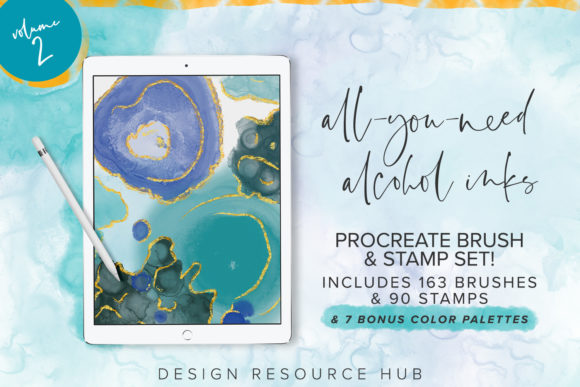
At the heart of this collection is the "All-You-Need Alcohol Inks Volume 2" set, which serves as the core engine for creating realistic fluid art. However, the true value of the Procreate Alcohol Ink Megapack lies in its breadth. With a total of 163 brushes and 90 unique stamps, the library covers a vast array of artistic requirements. These are not generic assets; they are handmade and crafted specifically for the Procreate app on iPad. It is crucial to note that these files are optimized exclusively for Procreate and are not suitable for Adobe Photoshop or other desktop applications. This specialization ensures that every brush leverages the specific rendering engine of Procreate for maximum performance and visual fidelity.
The inclusion of 90 stamps is particularly beneficial for artists who struggle with the initial "blob" formation in alcohol ink art. Creating realistic ink drops manually can be time-consuming. These pre-made stamps allow users to place perfect starting points for their designs, which can then be manipulated using the accompanying brushes to create blooms, tendrils, and cells. Furthermore, the addition of seven bonus color palettes removes another barrier to entry: color theory. Alcohol ink art often relies on specific pigment interactions to create depth and contrast. These curated palettes provide tested combinations that guarantee vibrant, harmonious results, helping users avoid muddy or dull outcomes.
Practical Applications Beyond Fine Art
While the primary appeal of the Procreate Alcohol Ink Megapack is for fine art and illustration, its utility extends into commercial design and branding. The organic, high-end look of alcohol ink is increasingly popular in marketing materials, luxury packaging, and web design. Graphic designers can use these brushes to create unique backgrounds for posters, social media graphics, and website headers that stand out from stock photography. Because the assets are digital, they are infinitely scalable and editable, unlike scanned physical artwork.
For logo designers and brand strategists, the ability to generate custom textures quickly is invaluable. Instead of searching for royalty-free textures that may be overused, designers can create bespoke elements that align perfectly with a client’s color scheme. The brushes allow for subtle accents or bold statement pieces, depending on the opacity and flow settings. This versatility makes the megapack a practical investment for freelancers and agencies looking to elevate their visual identity offerings.
Installation and Workflow Integration
Getting started with the Procreate Alcohol Ink Megapack is straightforward, though it requires a basic understanding of file management on iOS. There are several efficient methods for importing the brush set after purchase. For users with cloud storage solutions like Dropbox or Google Drive, the process is seamless. Simply open the brush set file within your cloud app, select the "Export" or "Open In" option, and choose Procreate. The app will automatically import the brushes and stamps into a new, dedicated folder within your library, keeping your workspace organized.
Apple users with a Mac running macOS 10.11 or higher can also utilize AirDrop for instant transfer. This method is often faster for large files and avoids the need for third-party cloud accounts. Once imported, it is recommended to spend some time experimenting with the different brush settings. While basic knowledge of Procreate is helpful, it is not strictly required. The intuitive nature of the Apple Pencil interaction means that even beginners can achieve impressive results by simply varying their pressure and speed. However, understanding layers and blend modes will significantly enhance the depth and realism of the final artwork.
Tailoring the Experience to Your Skill Level
Different users will approach the Procreate Alcohol Ink Megapack in varied ways, depending on their experience and goals. Beginners may find the stamps and color palettes to be the most valuable components, as they provide a structured starting point. By using stamps to lay down initial shapes and then applying broad strokes with the brushes, novices can learn how ink behaves without feeling overwhelmed by technical controls. This guided approach builds confidence and encourages experimentation.
Intermediate and advanced artists, on the other hand, may focus on the nuanced capabilities of the 163 brushes. They might explore how different brush tips interact with specific canvas textures or how layering multiple translucent strokes can create complex depth. These users might also customize the brushes further, adjusting size limits or streamline settings to match their personal drawing style. The megapack serves as a robust foundation that can be adapted to individual workflows, whether one prefers loose, abstract expressions or tight, controlled illustrative styles.
Maximizing Value with the Apple Pencil
To get the full value out of the Procreate Alcohol Ink Megapack, using an Apple Pencil is essential. The brushes are calibrated to respond to the subtle pressure variations and tilt angles that only a stylus can provide. Finger painting, while possible in Procreate, will not yield the same level of precision or dynamic range with these specific tools. The pressure sensitivity allows for delicate wisps of color as well as bold, saturated floods, mirroring the physical properties of real alcohol ink. Investing in a good quality stylus ensures that the digital experience feels tactile and responsive, bridging the gap between screen and canvas.
In conclusion, the Procreate Alcohol Ink Megapack is more than just a collection of digital assets; it is a complete workflow solution for modern creators. By addressing the technical difficulties of replicating fluid media, it empowers artists to explore new aesthetic territories with confidence. Whether you are designing a brand identity, creating fine art prints, or simply exploring the joy of digital painting, this toolkit offers the flexibility, quality, and ease of use needed to bring your vision to life.