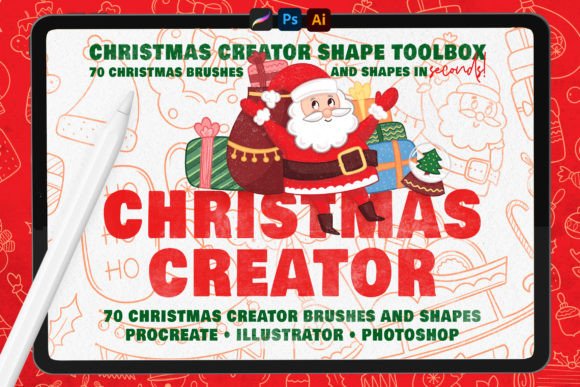
Streamline Holiday Design with the Christmas Creator Shape Toolbox
The holiday season brings a unique paradox for creative professionals. While demand for festive content surges, the time available to produce high-quality work often shrinks. Whether you are designing greeting cards, social media assets, or packaging for small business clients, the pressure to deliver polished, thematic visuals can be overwhelming. This is where specialized tools like the Christmas Creator Shape Toolbox become invaluable. It is not merely a collection of clip art; it is a workflow accelerator designed to bridge the gap between conceptual ideas and finished digital illustrations.
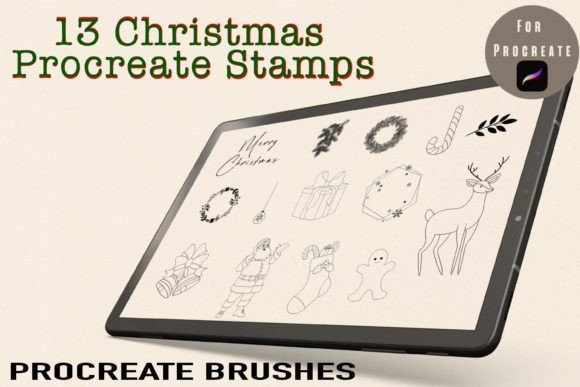
For many designers, drawing complex organic shapes from scratch is one of the most time-consuming aspects of illustration. Creating a perfectly symmetrical wreath, a detailed gingerbread man, or a balanced snowflake requires precision that can eat up hours of billable time. The Christmas Creator Shape Toolbox addresses this bottleneck by providing 70 authentic shape brushes that serve as robust foundations for your designs. By handling the structural heavy lifting, this toolkit allows you to focus on what truly differentiates your work: texture, color theory, and artistic style.
Accelerating Workflow Without Sacrificing Authenticity
One of the primary concerns when adopting any preset or brush pack is the risk of generic-looking output. However, the value of the Christmas Creator Shape Toolbox lies in its flexibility. These are not static images but dynamic shape brushes compatible with industry-standard software including Adobe Photoshop, Procreate, and Adobe Illustrator. This distinction is crucial for professional workflows.
In Procreate and Photoshop, the 70 shape brushes allow you to stamp a base element onto your canvas instantly. From there, the creative control remains entirely in your hands. You can adjust the stroke width, change colors, and, most importantly, texturize the shapes using your favorite custom brushes. This means a simple outline of a Christmas tree can be transformed into a rustic pine illustration with rough edges, or a sleek, modern vector-style graphic, depending on your client’s needs. The tool speeds up the initial sketching phase, enabling you to iterate through multiple composition ideas in minutes rather than hours.
For instance, consider a freelancer tasked with creating a series of Instagram stories for a local bakery during December. Instead of spending an hour drawing each cookie and candy cane from scratch, they can use the shape brushes to lay out the composition rapidly. They can then spend their energy adding realistic crumbs, icing textures, and shadows, resulting in a higher-quality final product delivered faster.
Versatility Across Platforms and Styles
The Christmas Creator Shape Toolbox is designed with cross-platform compatibility in mind, acknowledging that modern creators often switch between devices and software. The package includes specific files tailored for different environments:
- Procreate and Photoshop: Users receive 70 shape brushes along with five additional painting brushes. These are ideal for raster-based illustrations, digital painting, and textured designs. The ability to manipulate these shapes as brush strokes means they integrate seamlessly into existing layer structures and blending modes.
- Adobe Illustrator: For those who require scalable vector graphics, the toolbox provides .ai vector files. This is essential for print projects such as large-format banners, packaging, or merchandise where resolution independence is non-negotiable.
This versatility makes the toolkit suitable for a wide range of projects. Educators creating winter-themed worksheets can use the simple shapes to build engaging visuals for children. Marketers can assemble retro-style holiday advertisements by combining the shapes with vintage color palettes and grain effects. Even hobbyists looking to create personalized digital holiday cards will find the learning curve minimal. The process is straightforward: select the brush, draw the shape, and customize. There is no need for advanced vector manipulation skills to get started, yet the results look professional.
Enhancing Creativity Through Constraint and Combination
Paradoxically, having too many options can sometimes lead to creative block. The Christmas Creator Shape Toolbox offers a curated selection of 70 authentic objects, which provides enough variety to keep designs fresh without causing decision fatigue. The set includes traditional symbols such as ornaments, bells, holly, and stars, but also more nuanced elements that allow for unique combinations.
By mixing and matching these shapes, you can create hundreds of distinct design variations. A snowflake can be layered over a circular badge to create a winter seal. A garland shape can be twisted around typography to frame a holiday sale announcement. The included five painting brushes further enhance this creative potential, allowing you to add hand-drawn details that soften the digital precision of the shapes. This hybrid approach—combining precise geometric bases with organic textural overlays—results in illustrations that feel both polished and human-made.
Consider the application in web design. A blogger might want to add festive flair to their header images without cluttering the layout. Using the shape brushes, they can create subtle, semi-transparent background elements that evoke the holiday spirit without distracting from the main content. This level of customization ensures that the festive elements support the brand identity rather than overpowering it.
Who Benefits Most from This Toolkit?
While any digital artist can benefit from time-saving tools, certain groups will find the Christmas Creator Shape Toolbox particularly impactful:
- Freelance Graphic Designers: Time is money. Reducing the hours spent on repetitive drawing tasks directly increases profitability. The ability to deliver high-volume holiday assets quickly can help freelancers take on more clients during the peak season.
- Small Business Owners: Entrepreneurs who handle their own marketing often lack advanced illustration skills. This toolkit lowers the barrier to entry, allowing them to create professional-looking promotional materials in-house without hiring external agencies.
- Educators and Content Creators: Teachers and bloggers frequently need thematic visuals to engage their audiences. The ease of use allows them to generate custom illustrations that align perfectly with their lesson plans or article topics.
- Digital Illustrators: Even experienced artists can benefit from the efficiency of shape brushes for background elements or repetitive patterns, freeing up mental energy for focal points and complex character designs.
Practical Considerations and Limitations
It is important to understand the technical specifications before integrating this tool into your workflow. As noted, the brushes are specifically formatted for Procreate and Photoshop. If you are exclusively an Illustrator user, you will rely on the .ai vector files rather than the brush engine. Additionally, while the shapes provide an excellent base, they are not a substitute for fundamental design principles. Effective use of the Christmas Creator Shape Toolbox still requires an eye for composition, color harmony, and spacing.
Furthermore, because these are digital assets, ensuring you have the correct software versions is essential. Procreate users should ensure their app is updated to support the latest brush formats, while Photoshop users should be familiar with loading custom brush sets. For those new to digital illustration, there may be a slight learning curve in understanding how to adjust stroke dynamics and texture overlays, but numerous online tutorials can bridge this gap quickly.
In conclusion, the Christmas Creator Shape Toolbox represents a strategic investment for anyone involved in digital creation during the holiday season. It balances efficiency with creative freedom, offering a robust set of 70 shapes that serve as building blocks for diverse projects. By reducing the technical friction of drawing complex forms, it empowers creators to produce more work, experiment with new styles, and meet tight deadlines with confidence. Whether you are crafting a single greeting card or a comprehensive holiday campaign, this toolkit provides the structural support needed to bring your festive visions to life.