Procreate Sun Ray Overlay Stamps X12: Enhancing Digital Art with Light
In the rapidly evolving world of digital illustration, lighting effects often distinguish a good piece from a great one. Light adds depth, mood, and realism, yet rendering it manually can be time-consuming and technically demanding. This is where specialized tools like the Procreate Sun Ray Overlay Stamps X12 become invaluable assets for creators. These instant download, hand-drawn digital brushes are designed to streamline the workflow for artists who wish to incorporate radiant light effects into their work without sacrificing artistic integrity or spending hours on manual rendering.
Whether you are a seasoned professional illustrator, a hobbyist scrapbooker, or a business owner creating print-on-demand goods, understanding how to leverage these digital stamps can significantly elevate your creative output. This article explores the features, applications, and practical considerations of using this specific brush pack within the Procreate ecosystem.
Understanding the Tool: What Are Sun Ray Overlay Stamps?
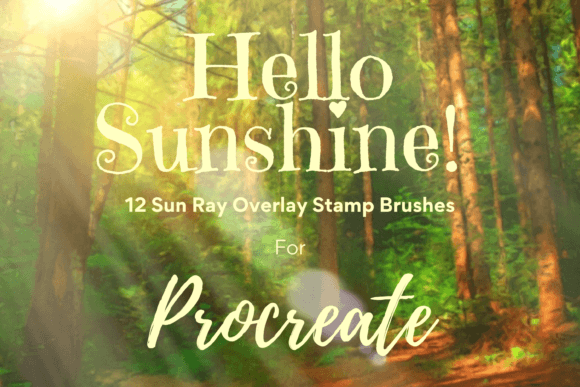
The Procreate Sun Ray Overlay Stamps X12 are not traditional painting brushes that simulate paint flow. Instead, they are stamp-style brushes. When you tap the screen with an Apple Pencil, the brush places a pre-designed graphic element—in this case, a sun ray or light burst—onto your canvas. The pack includes twelve unique individual digital brushes, each offering a different variation of light rays, beams, and flares.
These elements are hand-drawn, which provides them with an organic, authentic feel that differs sharply from the rigid, mathematical perfection of computer-generated vector graphics. This organic quality makes them particularly suitable for projects that aim for a warm, handmade, or artistic aesthetic. Because they are digital stamps, they offer immediate results, allowing artists to experiment with composition and lighting rapidly.
Key Characteristics and Features
To fully utilize these tools, it is essential to understand their technical characteristics:
- Digital Format: These files are exclusively digital brushes compatible only with the Procreate app. They are not standalone image files (like JPEGs or PNGs) until exported from the app.
- Customizability: Every stamp can be resized and recolored. This flexibility ensures that the light effects can match any color palette or scale required by your project.
- Layer Compatibility: The stamps interact seamlessly with Procreate’s layer system, allowing for advanced editing techniques such as clipping masks and blending modes.
- Instant Access: As an instant download, the product provides immediate access to assets, facilitating quick project turnaround times.
Practical Applications Across Creative Industries
The versatility of the Procreate Sun Ray Overlay Stamps X12 extends far beyond simple digital paintings. Their utility spans various creative disciplines, from personal DIY projects to commercial design work.
Digital Crafting and Illustration
For digital artists, these brushes serve as powerful compositional tools. They can be used to create focal points in an illustration, guiding the viewer’s eye toward a specific subject. For example, in character design, a sun ray stamp placed behind a character can create a dramatic backlighting effect, separating the figure from the background and adding a sense of divine or heroic presence.
Furthermore, these stamps are excellent for creating watercolor-style illustrations. By using the stamp as a guide, reducing its opacity, and painting over it on additional layers, artists can achieve complex light effects with greater control. This technique allows for the creation of soft, diffused light that mimics traditional watercolor washes while maintaining the precision of digital tools.
Print-on-Demand and Commercial Goods
Business owners involved in print-on-demand services can leverage these brushes to create unique designs for various products. The sun ray motifs are popular in contemporary design, appearing frequently on:
- Greeting Cards: Adding a touch of warmth and positivity to birthday, congratulatory, or seasonal cards.
- Wall Art: Creating minimalist bohemian prints that feature abstract light bursts and geometric sun elements.
- Wrapping Paper: Designing custom patterns where sun rays repeat across the surface, creating a festive and bright aesthetic.
- Apparel: Incorporating light effects into t-shirt or tote bag designs to add visual interest and depth.
The ability to resize and recolor the stamps means that a single brush set can generate hundreds of unique designs, maximizing the return on investment for creative entrepreneurs.
Scrapbooking and Invitations
In the realm of paper crafts and event planning, these digital elements bridge the gap between traditional and modern design. Scrapbookers can integrate these sun rays into digital layouts before printing, adding a cohesive theme of warmth and nostalgia to memory books. Similarly, invitation designers can use the stamps to create elegant headers or backgrounds for wedding invitations, baby showers, and summer events, enhancing the overall visual appeal without requiring advanced graphic design skills.
Technical Workflow: How to Use the Brushes Effectively
While the concept of stamping light rays seems straightforward, achieving professional results requires understanding the technical workflow within Procreate. Here is a step-by-step approach to integrating these brushes into your projects.
Installation and Setup
Before using the brushes, ensure you have the necessary hardware and software. The Procreate Sun Ray Overlay Stamps X12 require an iPad with the Procreate app installed and an Apple Pencil for precise control. To install the brushes:
- Download the file package to your iPad using a platform like iCloud or Files.
- Unzip the downloaded file using a compatible unzipping program.
- Open Procreate and import the .brushset file by tapping on the brush library and selecting "Import."
It is crucial to note that these files will not work outside of the Procreate environment. They are not compatible with Photoshop, Procreate Pocket, or other drawing applications unless specifically converted, which is generally not recommended due to potential loss of functionality.
Resizing and Recoloring
Once imported, you can customize each stamp to fit your needs. To resize a stamp, you can use the brush resize tool within Procreate’s brush settings, adjusting the size slider until the ray fits your composition. Alternatively, after stamping, you can use the Move and Resize tool (the arrow icon) to scale the element non-destructively. This dual approach offers flexibility during both the creation and editing phases.
Recoloring is equally simple. Select the layer containing the sun ray stamp and use the color disc to choose a new hue. Because the stamps are typically monochromatic or gradient-based, they accept color changes uniformly, allowing for seamless integration into any color scheme.
Advanced Techniques: Opacity and Clipping Masks
To achieve a more natural look, consider adjusting the opacity of the stamp. A sun ray at 100% opacity may appear harsh and artificial. Reducing the opacity to 30-60% often creates a softer, more ethereal glow that blends better with underlying artwork.
Another powerful technique involves using clipping masks. Create a new layer above your sun ray stamp, clip it to the stamp layer, and paint with soft brushes. This allows you to add texture, shadows, or additional colors specifically within the boundaries of the sun ray, giving you complete control over the final appearance. This method is particularly effective when creating watercolor illustration art pieces, as it allows for the layering of textures that mimic paper grain and paint saturation.
Evaluating Suitability: Is This Pack Right for You?
While the Procreate Sun Ray Overlay Stamps X12 offer significant benefits, they may not be suitable for every project or user. Consider the following factors when evaluating their usefulness:
Strengths:
- Time Efficiency: Dramatically reduces the time needed to create complex lighting effects.
- Ease of Use: Requires minimal technical skill to achieve professional-looking results.
- Versatility: Applicable to a wide range of projects, from digital art to print goods.
Limitations:
- Platform Dependency: Strictly limited to Procreate on iPad. Users without an iPad or Apple Pencil cannot utilize these tools.
- Stylized Nature: The hand-drawn style may not suit hyper-realistic or corporate minimalist designs that require precise, geometric lines.
- Learning Curve for Advanced Features: While basic stamping is easy, mastering clipping masks and blending modes requires some practice.
For users seeking quick, organic, and warm lighting effects for creative projects, this brush pack is an excellent addition to their digital toolkit. However, those requiring vector-based scalability or cross-platform compatibility should explore alternative solutions.
Conclusion
The Procreate Sun Ray Overlay Stamps X12 represent a practical solution for artists and designers looking to enhance their work with beautiful, hand-drawn light effects. By understanding their features, limitations, and potential applications, users can effectively integrate these tools into their workflow, saving time and elevating the visual quality of their projects. Whether used for digital illustrations, print-on-demand products, or personal DIY crafts, these brushes offer a versatile and engaging way to bring light and warmth to creative endeavors.