Procreate Face Charts Stamps: Streamlining Your Makeup Design Workflow
Digital art has fundamentally changed how makeup artists plan, present, and perfect their craft. For years, the industry relied on paper face charts—blank templates where artists would sketch out looks using colored pencils or markers. While there is a certain charm to traditional media, the digital shift offers speed, flexibility, and an endless palette without the mess. At the heart of this transition are Procreate Face Charts Stamps, a specialized tool that allows creators to bypass the tedious process of drawing facial structures from scratch every single time.
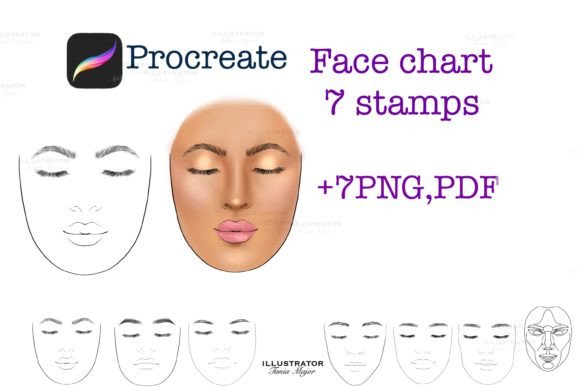
These stamps are not just simple images; they are functional assets designed specifically for the Procreate iPad app. By integrating pre-drawn, high-quality female face templates directly into your brush library, you transform your device into a rapid prototyping studio. Whether you are a freelance makeup artist preparing for a bridal consultation, a beauty student practicing contouring techniques, or a digital illustrator creating fashion editorial concepts, these tools provide a consistent foundation for your creativity.
Bridging the Gap Between Concept and Client
One of the most significant challenges in the beauty industry is communication. A client might describe wanting a "soft, smoky eye with a nude lip," but their interpretation of "smoky" might differ vastly from yours. This is where Procreate face charts stamps for Make up Artist PNG, PDF formats become invaluable. Instead of relying solely on verbal descriptions or generic inspiration photos, you can create a custom visualization in minutes.
Imagine sitting across from a bride-to-be. She is nervous about how a bold red lip will look with her specific skin tone and eye shape. Using a Female face stamp for procreate, you can instantly place a neutral base on the screen. With a few strokes, you apply the red lip, adjust the opacity to mimic different intensities, and even swap out eye shadow colors to see what complements the look best. This real-time collaboration builds trust. The client sees exactly what you envision, reducing anxiety and ensuring that the final result on the wedding day matches the agreed-upon design.
The ability to change the color and size of the stamp means you are not locked into one perspective. If a client has a unique face shape, you can select the template that most closely resembles their features from the set of seven included stamps. This level of customization turns a standard consultation into a personalized design session, elevating your professional service above competitors who still rely on static mood boards.
Educational Tools for Aspiring Artists
Beyond professional consultations, these digital assets serve as powerful educational resources. Makeup schools and independent tutors often struggle to provide enough practice materials for students. Printing hundreds of paper face charts is costly and environmentally taxing. Digital stamps offer a sustainable, infinite alternative.
Students can use the Procreate Portrait 🎀 templates to practice symmetry, blending, and color theory without the pressure of ruining a physical piece of paper. If a student makes a mistake while practicing a cut-crease technique, they simply undo the action or start a new layer. This encourages experimentation. They can try unconventional color combinations—like pairing electric blue liner with orange blush—without fear of waste.
Furthermore, instructors can assign homework that requires students to submit digital face charts. Because the files are standardized, it is easier to grade and provide feedback. An instructor can draw corrections directly over the student’s work on a separate layer, highlighting areas where blending needs improvement or where proportions are off. This interactive feedback loop accelerates learning and helps students develop a keen eye for detail before they ever touch a real client’s face.
Efficiency for High-Volume Professionals
For makeup artists working in fast-paced environments like fashion weeks, film sets, or large bridal expos, time is a luxury they rarely have. Drawing a face chart from scratch for every model or client is impractical when you have minutes between appointments. This is where the efficiency of Procreate brushes compatible with the Procreate iPad app only shines.
The workflow is incredibly streamlined. You download the brushes file to your iPad, import the set into Procreate, and you are ready to go. To put a stamp, you need to touch once on the screen. That single tap places a perfectly proportioned face template onto your canvas. From there, you can immediately begin applying digital makeup. This speed allows artists to document their work efficiently. After completing a look on a model, an artist can quickly replicate the design on a digital chart to send to the production team or archive for future reference.
The inclusion of both PNG and PDF formats ensures versatility. PNGs are ideal for digital manipulation within Procreate, allowing for transparent backgrounds and easy layering. PDFs, on the other hand, are perfect for printing if a physical copy is needed for a portfolio review or a client who prefers tangible takeaways. Having both options in one package means you are prepared for any scenario.
Choosing the Right Template for Your Needs
Not all face shapes are created equal, and neither are all face charts. The set containing 7 stamps offers variety, which is crucial for realistic representation. When selecting a template, consider the purpose of your design. If you are creating a tutorial for hooded eyes, choose the stamp that best represents that eye structure. If you are designing a look for a client with a strong jawline, pick the template with similar bone structure.
It is important to note that these brushes require Procreate Version 5 and higher. This ensures that the brush engine handles the stamping mechanism correctly, allowing for smooth resizing and color adjustments. Older versions may not support the specific coding used in these custom brushes, leading to glitches or improper rendering. Always check your app version before purchasing or downloading to avoid technical frustrations.
Another consideration is the style of the stamp. Some face charts are highly realistic, with detailed shading and texture, while others are minimalist line drawings. The perfect face Template included in this set tends toward a clean, balanced aesthetic that serves as a neutral canvas. This neutrality is a strength because it does not impose a specific ethnic feature set or exaggerated proportion, allowing the makeup design to take center stage. However, artists should be aware that no single template can represent every human face. These tools are starting points, not absolute truths. Skilled artists will use them as bases, modifying lines and shapes with additional brushes to better match their specific subject.
Creative Freedom Beyond Traditional Makeup
While primarily marketed toward makeup artists, these stamps have found a niche among fantasy illustrators and character designers. The Procreate Face Charts Stamps provide a consistent anatomical base for creating characters. A concept artist designing a series of elves, vampires, or futuristic cyborgs can use the same face stamp to maintain consistency across multiple character designs. By changing only the makeup, markings, or digital accessories, they can create a cohesive visual language for their world.
Tattoo artists also benefit from these tools. Placing a design on a digital face chart allows clients to visualize how a facial tattoo or intricate cheek art might look before committing to ink. The ability to resize and recolor the design instantly helps in refining the placement and scale, ensuring the final tattoo harmonizes with the client’s features.
In essence, these digital stamps are more than just shortcuts; they are enablers of creativity. They remove the barrier of technical drawing skill, allowing artists to focus on what they do best: designing beautiful, transformative looks. Whether you are enhancing natural beauty for a bride, creating avant-garde art for a runway, or teaching the next generation of beauty professionals, integrating these tools into your workflow can significantly enhance your productivity and creative output.