Mastering Texture with Reptile Skin Brush Set
Texture is often the silent hero of digital illustration. It bridges the gap between a flat, sterile image and a piece of art that feels tangible, lived-in, and real. For concept artists, matte painters, and illustrators, achieving organic realism—particularly with complex surfaces like scales, hides, and rough skin—can be a tedious bottleneck. This is where the Reptile Skin Brush Set changes the workflow. It is not merely a collection of static stamps; it is a dynamic toolset designed to integrate seamlessly into the painting process, allowing artists to build texture with the same fluidity they use for color and light.
Beyond Simple Stamping: A Painterly Approach
Many texture brushes on the market function primarily as overlay stamps. You click, a pattern appears, and you spend the next twenty minutes erasing edges and adjusting opacity to make it look natural. The Reptile Skin Brush Set takes a different philosophy. These 28 unique, high-resolution Photoshop brushes are engineered to be painted with. This distinction is critical for professional workflows. When you can paint texture, you maintain control over the flow, density, and direction of the scales. You are no longer fighting against a rigid pattern; you are guiding it.
This painterly capability makes the set ideal for sketches and serves as an robust base for illustrations. Whether you are blocking in the rough form of a dragon’s flank or refining the subtle dermal details of a realistic lizard, these brushes respond to pressure and tilt (depending on your hardware) in a way that mimics traditional media. The result is a texture that feels grown rather than pasted, providing a solid foundation for further detailing without the uncanny valley effect that repetitive stamping often creates.
Versatility Across Creative Disciplines
The utility of the Reptile Skin Brush Set extends far beyond fantasy creature design. Its applications are diverse, touching several key areas of digital creation:
- Concept Art and Character Design: Speed is essential in concept art. These brushes allow artists to iterate quickly on creature designs, testing different scale patterns and skin types without getting bogged down in manual rendering. This efficiency frees up time to focus on silhouette, anatomy, and narrative.
- Matte Painting and Environment Art: While focused on reptiles, the organic, irregular nature of these textures is perfect for adding weathering to rocks, ancient ruins, or alien landscapes. The high-resolution details hold up even when viewed closely, making them suitable for high-fidelity background work.
- Educational and Scientific Illustration: For educators and publishers creating biological diagrams or educational content, accuracy matters. The ability to paint specific scale arrangements helps in creating scientifically plausible representations of herpetological subjects, enhancing the credibility of educational materials.
- Commercial Branding and Packaging: Entrepreneurs and marketers in the gaming, publishing, or entertainment sectors can use these textures to create compelling visual assets for product packaging, book covers, or promotional materials. The tactile quality of the skin textures adds a premium feel to digital mockups.
Technical Compatibility and Workflow Integration
In today’s multi-platform creative environment, software lock-in is a significant concern. One of the strongest features of the Reptile Skin Brush Set is its broad compatibility. It is natively compatible with Photoshop CC, the industry standard for digital painting. However, it also supports Procreate 5.0, catering to the growing number of artists who prefer tablet-based workflows on iPad.
Furthermore, because the brushes are distributed in the standard .abr format, they can be imported into Clip Studio Paint v1.10.5 or newer and Affinity Photo. This flexibility ensures that freelancers and studio teams can utilize the same assets regardless of their preferred software ecosystem. For a business owner managing a team of diverse artists, this interoperability reduces friction and ensures consistent quality across different production pipelines.
Maximizing Efficiency with Layering
To get the most out of these brushes, consider a layered approach. Start with a large, soft brush to establish the base color and value structure of your creature. Then, use the Reptile Skin Brush Set on a new layer set to Overlay or Soft Light mode. This allows the texture to interact with the underlying colors, creating depth. Because these are high-resolution brushes, you can paint at a large scale and then resize your canvas without losing critical detail, a common pitfall with lower-quality texture sets.
For added realism, vary the opacity and flow. Do not apply the texture uniformly. Real skin has variations—areas where scales are worn smooth, regions where they are larger or more pronounced, and spots where dirt or moisture might alter the appearance. By painting with varying pressure, you mimic these natural inconsistencies. This technique transforms a generic texture into a specific, character-driven surface that tells a story about the creature’s life and environment.
Complementary Tools for Enhanced Results
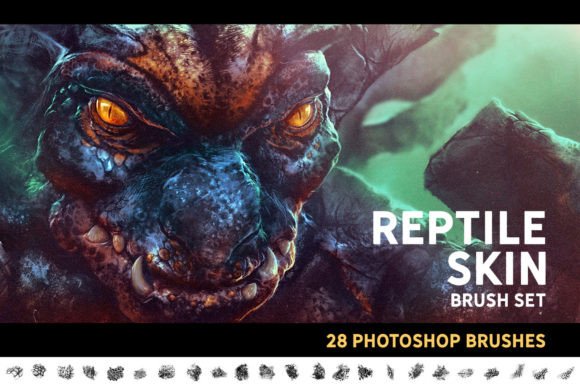
While the Reptile Skin Brush Set is powerful on its own, combining it with other specialized tools can elevate your artwork. For instance, the cover image demonstrates the synergy between this set and the Horns and Spikes Brush Set. Using the latter for teeth and protrusions while using the former for skin creates a cohesive anatomical structure. Additionally, integrating general-purpose tools like the Awesome Brush Bundle can help with blending, lighting, and atmospheric effects, ensuring that the textured elements sit naturally within the overall composition.
This modular approach to asset selection is a hallmark of professional digital art. Rather than relying on a single "magic" brush, experienced creators build a toolkit where each element serves a specific purpose. The reptile brushes handle the dermal complexity, while other tools manage form and light. This division of labor streamlines the creative process and results in higher-quality outputs.
Practical Considerations for Selection
When evaluating texture brushes, resolution is paramount. Low-resolution brushes become pixelated when scaled up, breaking immersion. The Reptile Skin Brush Set offers hi-res files, ensuring that even in close-up shots, the individual scales retain their definition. This is crucial for high-end commercial work where clients may request detailed crops for marketing materials.
Another consideration is ease of use. The description notes that this set "makes the texturing process much easier." This is not just marketing hype; it reflects the intuitive design of the brush tips. They are calibrated to avoid excessive repetition artifacts, a common issue where the human eye detects the repeating pattern of a stamp. By varying the rotation and spacing internally, these brushes maintain visual interest over large areas, reducing the need for manual correction.
For hobbyists and beginners, this set offers a learning opportunity. By observing how the brushes lay down texture, users can gain insights into the structure of organic surfaces. It serves as both a tool and a tutorial, helping artists understand how light interacts with complex geometries like scales and ridges.
Final Thoughts on Digital Texturing
In the competitive landscape of digital art, efficiency and quality are not mutually exclusive; they are interdependent. The Reptile Skin Brush Set embodies this balance. It provides the speed needed for professional deadlines while offering the control required for artistic excellence. Whether you are a freelancer pitching a creature design, a marketer creating eye-catching visuals, or an educator illustrating biological concepts, these brushes provide a reliable, versatile solution for organic texturing.
By integrating these tools into your workflow, you shift the focus from the mechanical labor of texture creation to the creative act of storytelling. The scales become more than just pixels; they become part of the narrative, conveying age, habitat, and species characteristics with every stroke. For any digital artist looking to refine their texturing capabilities, this set represents a worthwhile investment in both productivity and artistic range.