Dragon Scale Brush Set: Texture Mastery
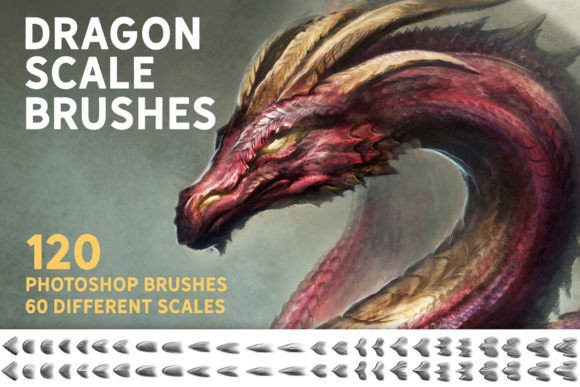
Creating realistic organic textures in digital art often feels like a battle against the software. You spend hours manually painting individual scales, feathers, or rough surfaces, only to find the result looks repetitive or artificial. This is where a specialized toolset changes the workflow entirely. The Dragon Scale Brush Set offers a solution that goes beyond simple stamping. It provides 120 unique Photoshop brushes designed to integrate seamlessly into your natural painting process, allowing you to build complex textures with the same fluidity as sketching a character.
The cover image for this collection features a dragon created exclusively using these brushes. This is not a composite of pre-made overlays but a demonstration of what is possible when you paint directly with texture. For concept artists, illustrators, and matte painters, this distinction is critical. It means you retain full artistic control over lighting, perspective, and form while leveraging the intricate detail of the brush engine.
Beyond Simple Stamping: Painting with Texture
Many texture brushes on the market function merely as stamps. You click, and a static image appears. While useful for quick backgrounds, stamps often fail when applied to curved surfaces or dynamic poses. They lack the responsiveness needed for high-end illustration. The Dragon Scale Brush Set addresses this limitation by offering brushes that react to pressure, tilt, and speed. You can actually paint with them, building up layers of scale density and variation just as you would with a standard round brush.
This capability transforms texturing from a tedious chore into an intuitive part of the creative process. When working on a creature design, for example, you can start with a loose sketch and gradually define the skin texture without switching tools constantly. The brushes allow for gradual buildup, meaning you can establish a base layer of small scales and then paint larger, more prominent plates over specific areas like the spine or shoulders. This layering technique creates depth and realism that static stamps cannot achieve.
Efficiency in Concept Art and Matte Painting
In professional environments such as game development or film production, time is a finite resource. Concept artists must iterate quickly, exploring multiple designs before settling on a final direction. Traditional methods of texturing every inch of a creature’s skin can bottleneck this process. By utilizing the Dragon Scale Brush Set, artists can reduce the time spent on repetitive detailing by significant margins.
Consider the workflow of a matte painter creating a fantasy landscape. Adding realistic reptilian creatures or ancient, scaled armor to a scene requires consistency and speed. With 120 unique variations available, you can avoid the "tiling" effect that plagues many digital paintings. Each brush offers slight differences in shape, size, and edge hardness, ensuring that large areas of texture remain visually interesting and organic. This variety supports the creation of believable worlds where no two sections look exactly alike.
Furthermore, these brushes serve as an excellent base for illustrations. Instead of starting from a blank canvas, you can block in major forms and immediately apply a textured underpainting. This approach helps in visualizing the final material quality early in the process, allowing for better decision-making regarding color palettes and lighting setups.
Cross-Platform Compatibility for Modern Workflows
Digital artists today rarely rely on a single piece of software. You might sketch on an iPad, refine in Photoshop, and add final touches in Clip Studio Paint. The versatility of the Dragon Scale Brush Set reflects this modern, multi-device workflow. The brushes are natively compatible with Photoshop CC and Procreate 5.0, covering the two most popular platforms for digital illustration.
For users of other industry-standard applications, the set remains highly accessible. The .abr file format is widely supported, meaning you should be able to import these brushes into Clip Studio Paint v1.10.5 or newer and Affinity Photo. This cross-compatibility ensures that your investment in a toolset is not locked to a single ecosystem. Whether you prefer the vector-based precision of Clip Studio or the non-destructive editing power of Affinity, you can integrate these textures into your preferred environment.
This flexibility is particularly beneficial for freelancers and small business owners who may need to collaborate with clients using different software. Being able to share textured assets or work files without worrying about incompatible brush formats simplifies communication and reduces technical friction in collaborative projects.
Ideal Use Cases and Practical Applications
While the name suggests a focus on fantasy creatures, the utility of this set extends far beyond dragons. Here are several practical scenarios where these brushes add significant value:
- Creature Design: Naturally, the primary use is for reptiles, dinosaurs, and mythical beasts. The variation in scale shapes allows for accurate biological representation, from the fine scales of a snake to the armored plates of an ankylosaur.
- Armor and Equipment: Fantasy armor often incorporates leather, chainmail, and scaled materials. These brushes can quickly texture shoulder pads, gauntlets, and shields, adding a sense of weight and history to equipment designs.
- Environmental Details: Use the brushes to create textured rock formations, dried earth, or tree bark. With adjustments to opacity and blending modes, the scale patterns can mimic various organic surfaces found in nature.
- Fashion and Textile Design: For illustrators working on character costumes, these brushes can simulate exotic fabrics, sequined materials, or intricate embroidery patterns that require a repetitive yet varied structure.
The key to maximizing these benefits lies in experimentation. Because the brushes are paintable, you can combine them with standard blending tools. Try painting with a low-flow setting to build up subtle texture in shadow areas, then switch to a higher opacity for highlighted ridges. This technique mimics how light interacts with real-world surfaces, enhancing the three-dimensional feel of your artwork.
Considerations for Best Results
While the Dragon Scale Brush Set significantly accelerates the texturing process, it is not a magic button for perfect art. Understanding its limitations ensures realistic expectations. Since these are raster-based brushes, scaling them up excessively after painting may result in pixelation. It is best to paint at a high resolution from the start, especially if the final output is intended for print or large-format displays.
Additionally, while the brushes provide a strong foundation, they work best when combined with traditional painting skills. Lighting, color theory, and anatomical accuracy still drive the quality of the final image. The brushes handle the micro-details, but the artist must guide the macro-forms. Users should view this set as a powerful assistant rather than a replacement for fundamental artistic knowledge.
For those new to digital texturing, there may be a learning curve in adjusting brush settings like spacing, jitter, and pressure sensitivity. Taking time to customize these parameters within your software can yield even more unique results. Most applications allow you to tweak the dynamics of imported brushes, enabling you to tailor the Dragon Scale Brush Set to your specific hand movements and stylistic preferences.
Enhancing Your Creative Toolkit
Investing in specialized tools like the Dragon Scale Brush Set is about more than just acquiring new assets; it is about expanding your creative vocabulary. By removing the technical barrier of manual texturing, you free up mental energy to focus on composition, storytelling, and character expression. Whether you are a hobbyist looking to improve the quality of your fan art or a professional seeking to streamline your production pipeline, these brushes offer a tangible improvement in workflow efficiency.
The ability to paint textures directly, rather than pasting them, preserves the integrity of your artistic voice. It ensures that every scale follows the contour of the muscle beneath it, every highlight sits correctly on the ridge, and every shadow deepens the sense of volume. In a competitive creative industry, these details often distinguish good work from great work. By integrating versatile, high-quality tools into your routine, you position yourself to deliver higher quality results in less time, supporting both your creative goals and professional objectives.