Strategic Visual Impact: Mastering the Dynamic Fire FX Brush Set
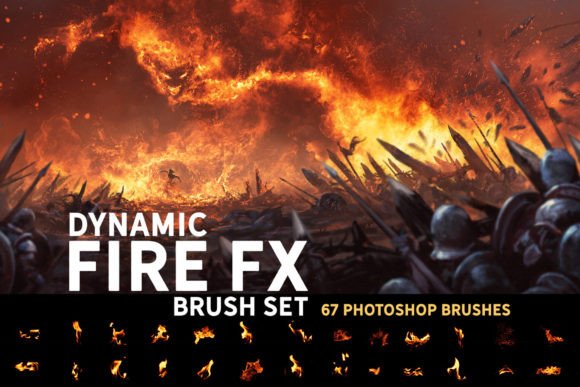
In the realm of digital art and visual communication, texture is not merely an aesthetic choice; it is a functional tool for directing attention and conveying energy. The Dynamic Fire FX Brush Set represents a shift from static asset placement to dynamic, painterly creation. For professionals ranging from concept artists to marketing designers, the ability to render convincing fire, sparks, and intense heat effects efficiently can significantly impact project timelines and final output quality. This collection of 67 unique Photoshop brushes offers more than simple stamp overlays; it provides a toolkit for painting natural-looking flames with control and intentionality.
The Strategic Value of High-Fidelity Textures
When evaluating digital assets, the primary consideration should always be workflow integration and versatility. Many brush sets on the market offer single-use stamps that look impressive in isolation but fail to integrate seamlessly into a larger composition. The Dynamic Fire FX Brush set addresses this by allowing users to paint with the elements. This distinction is critical for maintaining artistic coherence. When you paint fire rather than pasting it, you retain control over the flow, density, and direction of the flames, ensuring they interact logically with the underlying illustration or matte painting.
For entrepreneurs and small business owners who manage their own branding or content creation, understanding the difference between decorative clutter and functional design is essential. Fire is a high-energy element. Used poorly, it distracts from the core message. Used strategically, it highlights key products, creates urgency, or establishes a dramatic tone. The Dynamic Fire FX Brush Set supports this strategic application by providing a range of intensities—from subtle, natural-looking flickers to aggressive, intense infernos. This variety allows creators to match the visual intensity to the emotional weight of their project.
Versatility Across Platforms and Workflows
Modern creative workflows are rarely confined to a single application. Professionals often move between Photoshop, Procreate, Clip Studio Paint, and Affinity Photo depending on the task at hand. The compatibility of the Dynamic Fire FX Brush Set reflects this reality. The brushes are fully compatible with Photoshop CC and Procreate 5.0, ensuring that tablet-based sketching and desktop-based refinement can share the same visual language. Furthermore, the inclusion of .abr files means that users of Clip Studio Paint v1.10.5 or newer and Affinity Photo can import these tools, broadening their utility across different operational environments.
This cross-platform flexibility is not just a technical feature; it is a productivity enhancer. For freelancers and agencies, the ability to maintain consistent visual assets across different software ecosystems reduces friction. You can begin a concept sketch on an iPad using Procreate, utilizing the spark brushes to indicate energy sources, and then transition to Photoshop for detailed matte painting without needing to source new assets. This continuity supports a more streamlined decision-making process, allowing the creator to focus on composition and lighting rather than technical compatibility issues.
From Sketch to Matte Painting: Practical Applications
The utility of the Dynamic Fire FX Brush Set extends across various stages of the creative pipeline. In the early sketching phase, the spark brushes can serve as quick indicators of light sources or magical effects, helping to establish the mood of a piece before significant rendering begins. As the project moves into the illustration phase, the natural-looking flame brushes provide a robust base. Because these are paintable brushes, artists can build up layers of heat and smoke, creating depth that static images often lack.
For concept artists and matte painters, the set offers a crucial advantage: speed without sacrificing realism. In high-pressure environments, such as game development or film pre-production, the ability to rapidly iterate on environmental hazards or magical effects is invaluable. The 67 unique brushes provide enough variation to prevent repetitive patterns, a common pitfall when using smaller brush sets. By combining intense flames with softer, ambient heat distortions, artists can create complex atmospheric effects that ground fantastical elements in a sense of physical reality.
Understanding the Technical Nuances
To achieve optimal results, it is important to understand the technical behavior of these brushes. A common misconception among new users is expecting immediate, self-contained glow effects. The Dynamic Fire FX Brush Set is designed to provide the structural and textural components of fire—the core flames, the embers, and the smoke. The glow effect, which is often dependent on specific blend modes and layer styles, requires a deliberate workflow.
For Photoshop users, the included Sample Workflow.psd file is an essential resource. It demonstrates how to layer the painted fire elements with adjustment layers and blending options to achieve the luminous quality associated with real fire. For Procreate users, the instructions provided in the .txt file guide the setup of layer properties to mimic this effect. This approach, while requiring an extra step, offers greater control. It allows the artist to adjust the intensity of the glow independently of the flame structure, enabling finer tuning of the final image’s lighting balance.
Risk Management in Visual Design
Using powerful visual elements like fire carries inherent risks. Without clear goals, such effects can easily overwhelm a composition, reducing readability and diluting brand messaging. The "more is better" mentality often leads to visual noise, where the viewer’s eye has no clear path to follow. To mitigate this, creators should approach the Dynamic Fire FX Brush Set with a plan. Define the role of the fire in your image. Is it a background element setting the mood? Is it a foreground action element driving the narrative? Or is it a subtle highlight drawing attention to a product?
Strategic use involves restraint. Start with the natural-looking flames to establish a baseline. Use the intense flames sparingly, focusing them on areas where you want to create maximum impact. The sparks should be used to suggest movement and energy, leading the viewer’s eye through the composition. By treating these brushes as part of a broader design strategy rather than isolated decorations, you ensure that they enhance rather than detract from the overall communication goal.
Long-Term Value and Skill Development
Investing in high-quality tools like the Dynamic Fire FX Brush Set is also an investment in skill development. Learning to paint with these brushes encourages a deeper understanding of light, color, and form. Unlike drag-and-drop assets, paintable brushes require the user to engage with the mechanics of the effect. This engagement fosters a more intuitive grasp of how fire behaves, which translates to better decision-making in other areas of digital painting and design.
For educators and mentors, this set can serve as a teaching tool for demonstrating the principles of atmospheric perspective and light interaction. For hobbyists, it offers a pathway to professional-level results without the steep learning curve of simulating fire from scratch. The long-term value lies in the adaptability of the tools. As your skills grow, you will find new ways to combine these brushes with other techniques, expanding your creative vocabulary.
Making the Decision to Integrate
Before integrating the Dynamic Fire FX Brush Set into your workflow, consider your current needs. If your work frequently involves fantasy elements, action sequences, or dramatic lighting, this set is a logical addition. If your work is primarily corporate or minimalist, the utility may be limited, though the spark brushes could still offer subtle accents for dynamic presentations. Assess your software ecosystem to ensure compatibility, particularly if you rely on Affinity Photo or Clip Studio Paint.
Ultimately, the goal is to enhance your ability to communicate visually. The Dynamic Fire FX Brush Set provides the means to do so with precision and flair. By approaching these tools with a strategic mindset—focusing on integration, control, and purposeful application—you can elevate your digital art and design projects. The result is not just a visually striking image, but a coherent, impactful piece of communication that resonates with your intended audience.
Remember that the glow effect is not automatic. Take the time to study the provided workflow files. Understand how layer modes interact with the painted textures. This initial investment of time pays dividends in the form of greater creative control and higher quality outputs. Whether you are creating a quick sketch or a detailed matte painting, the Dynamic Fire FX Brush Set offers the flexibility and power needed to bring your vision to life with confidence and clarity.