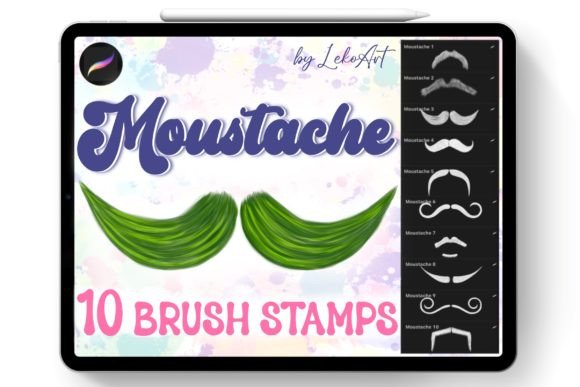
Moustache Brush Stamp Procreate Guide
Digital illustration has evolved rapidly, offering artists tools that significantly reduce the time spent on repetitive details. One such tool gaining traction among character designers and hobbyists is the Moustache Brush Stamp Procreate set. This specialized collection allows creators to add facial hair to portraits, caricatures, and illustrations with a single tap. For anyone who has struggled to draw symmetrical or stylish facial hair manually, this resource offers a practical solution that enhances workflow efficiency without sacrificing artistic integrity.
Understanding the Tool and Its Value
The core concept behind these brushes is simplicity and speed. When you purchase this product, you receive a curated set of ten distinct moustache styles. These are not generic shapes but carefully designed stamps that mimic various textures and silhouettes, from classic handlebars to modern stubble looks. The primary value lies in the ability to quickly create a hairstyle or facial hair arrangement that would otherwise require significant manual effort.
For beginners, drawing realistic hair can be intimidating. It requires an understanding of flow, texture, and lighting. With the Moustache Brush Stamp Procreate collection, users bypass the initial learning curve of rendering individual hairs. Instead, they can focus on placement, color adjustment, and blending. This shift allows novice artists to produce polished-looking characters faster, boosting confidence and encouraging further experimentation with digital media.
Professionals also benefit from this efficiency. In commercial projects where deadlines are tight, such as creating avatars for apps, designing stickers, or illustrating editorial pieces, saving minutes on each character adds up. Using pre-made stamps ensures consistency across multiple characters, which is crucial for branding or series-based artwork.
Compatibility and Technical Requirements
Before diving into the creative possibilities, it is essential to understand the technical constraints. This brush set is designed exclusively for Procreate on iPad. It will not work in other painting programs such as Photoshop, Clip Studio Paint, or Procreate Pocket on iPhone. This specificity is due to the unique file format (.brushset) that Procreate uses to store brush data, including shape, grain, and dynamics.
When you complete your purchase, you will receive one zip file containing the Moustache.brushset. The installation process is straightforward but requires an iPad. After downloading the file, open it directly on your device. The iPad’s operating system recognizes the file type and automatically imports it into Procreate. Once imported, the brush set appears in your library, ready for immediate use. There is no need for complex configuration or third-party software.
If you are using a different device or software, this product will not meet your needs. Ensuring you have an iPad with Procreate installed is the only prerequisite. This limitation ensures that the brushes perform optimally, leveraging Procreate’s specific engine for pressure sensitivity and tilt recognition, although stamp brushes primarily rely on tap placement rather than stroke dynamics.
Practical Applications and Use Cases
The versatility of the Moustache Brush Stamp Procreate set extends beyond simple portrait enhancement. Here are several contexts where these brushes prove invaluable:
- Character Design: Rapidly iterate through different looks for a protagonist. Test how a villain looks with a slicked-back moustache versus a rugged beard stubble without redrawing the entire face.
- Caricatures and Cartoons: Exaggerated facial features are staples of caricature art. These stamps provide bold, clear shapes that stand out well in cartoon styles, allowing artists to emphasize personality traits through facial hair.
- Sticker Creation: Digital stickers often feature isolated elements. Creating a pack of moustache-themed stickers for messaging apps becomes effortless when you can generate clean, high-quality shapes instantly.
- Educational Projects: Educators teaching digital art can use these brushes to demonstrate layering techniques. Students can learn how to adjust opacity, change blend modes, and apply color overlays using a consistent base shape.
- Marketing Materials: Small business owners creating personalized avatars for social media profiles can use these tools to add a unique touch to their brand identity, ensuring a professional yet approachable look.
Tips for Best Results
While the brushes are designed for ease of use, achieving a natural look requires some technique. Simply stamping the image onto the canvas is the first step, but integration is key. Here are some practical observations to help you get the most out of your purchase:
- Adjust Color and Tone: Rarely is facial hair pure black. Use the color picker to sample skin tones or hair colors from the rest of the portrait. Slightly desaturating the color and adjusting brightness helps the moustache blend seamlessly with the underlying skin texture.
- Use Layer Modes: Experiment with blend modes like Multiply or Overlay. These modes allow the texture of the skin beneath to show through the moustache, preventing it from looking like a flat sticker pasted on top.
- Transform and Rotate: No two faces are identical. Use the transform tool to resize, rotate, or flip the moustache to fit the specific angle of the face you are drawing. Flipping horizontally can also create variety if you want to reuse a style on different characters.
- Add Imperfections: Real hair is rarely perfect. Use a standard eraser brush or a soft airbrush to fade out edges or remove small sections. This breaks up the uniformity of the stamp and adds a hand-drawn feel.
Considerations Before Purchasing
As with any digital asset, it is important to align the product with your expectations. The Moustache Brush Stamp Procreate set is a niche tool. If your primary focus is landscape painting or abstract art, these brushes may see limited use. However, if you frequently draw people, animals, or anthropomorphic characters, this set becomes a highly valuable addition to your toolkit.
Additionally, consider your artistic style. These stamps work best for semi-realistic, cartoon, or graphic styles. For hyper-realistic portraits where every individual hair must be visible and distinct, you may still need to paint fine details manually. However, even in realistic works, these stamps can serve as an excellent underlayer or base structure, saving time on the initial blocking phase.
Remember that this is a digital download. There are no physical items shipped. Ensure you have a stable internet connection for the download and sufficient storage space on your iPad. Since the file is small, it should not pose any storage issues, but keeping your Procreate library organized is good practice.
Enhancing Your Creative Workflow
Incorporating specialized brushes like the Moustache Brush Stamp Procreate set is about working smarter, not harder. It allows you to delegate the tedious aspects of illustration to the software, freeing your mental energy for composition, storytelling, and color theory. Whether you are a freelancer looking to increase output, a blogger creating custom headers, or a hobbyist enjoying weekend drawing sessions, this tool supports your creative goals.
The inclusion of ten varied styles ensures that you have enough diversity to avoid repetition in your work. From subtle goatees to bold, statement pieces, the range covers most common facial hair trends. This variety means you can adapt to different character ages, backgrounds, and personalities without needing to search for additional resources.
Ultimately, the appeal of this product lies in its balance of convenience and quality. It respects the artist’s time while providing professional-grade results. By understanding its limitations and leveraging its strengths, you can integrate these brushes into your workflow seamlessly. Thank you for visiting my shop, and we hope this set inspires your next creative project.