Mastering Grunge Texture in Procreate
Digital art has evolved rapidly, moving from clean, vector-perfect lines to rich, tactile experiences that mimic the physical world. At the heart of this shift is the desire for authenticity. Viewers and customers alike are drawn to work that feels handcrafted, imperfect, and alive. This is where a specialized tool like the Grunge Texture Brush for Procreate becomes indispensable. It is not merely a digital stamp; it is a gateway to adding depth, history, and character to your illustrations, lettering, and brand assets.
For designers, illustrators, and small business owners, understanding how to effectively integrate texture can elevate a project from good to unforgettable. The grunge aesthetic, often associated with the raw energy of the 90s alternative scene, has matured into a sophisticated design element. When applied correctly, it breaks the sterile perfection of digital screens, creating a visual bridge between the viewer and the artwork. This article explores how to leverage these textures to enhance your creative workflow, improve brand perception, and create standout visual content.
The Visual Personality of Grunge Textures
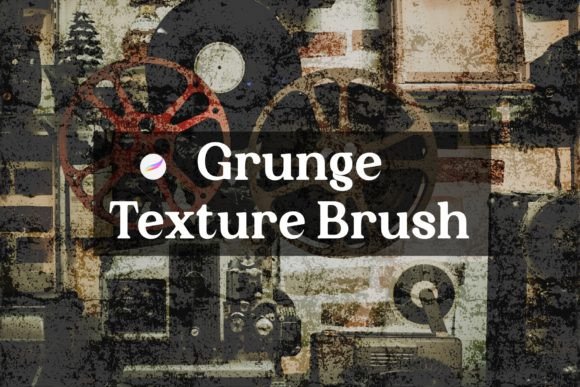
Unlike standard brushes that produce uniform strokes, a grunge texture brush introduces controlled chaos. It simulates the irregularities found in traditional media, such as dry ink on rough paper, charcoal smudges, or weathered paint. The visual characteristics are defined by their unpredictability. You might see speckles, scratches, faded edges, or uneven opacity within a single stroke. This "imperfection" is precisely what gives the style its appeal. It suggests human touch and organic origin, which resonates deeply in an era dominated by AI-generated smoothness.
When you incorporate a Grunge Texture Brush for Procreate into your workflow, you are essentially adding a layer of narrative. A clean, sans serif font might communicate modernity and efficiency, but overlaying it with a subtle grunge texture can suggest resilience, heritage, or edginess. This duality allows for complex brand storytelling. For instance, a coffee shop brand might use a warm, handwritten script paired with a coffee-stain texture to evoke comfort and tradition. Conversely, a streetwear label might use bold, blocky typography with heavy distressing to convey rebellion and urban energy.
The versatility of these textures means they are not limited to a single niche. They work exceptionally well in editorial design, where they can add mood to magazine layouts, and in packaging design, where tactile visuals can influence purchasing decisions on a shelf. In web design, used sparingly, they can create focal points that draw the eye without overwhelming the user interface. The key lies in understanding the personality of the texture. Some are subtle and dusty, suitable for background elements, while others are bold and abrasive, ideal for headlines and primary graphics.
Enhancing Brand Identity and Visual Hierarchy
In branding and marketing, consistency is crucial, but so is distinctiveness. A generic template rarely builds a memorable brand identity. Custom textures help establish a unique visual language that sets your business apart. When you use a specific set of grunge brushes consistently across your social media graphics, website banners, and printed materials, you create a cohesive look that audiences begin to recognize. This recognition builds trust and professionalism, even if the aesthetic is intentionally rough around the edges.
Consider the impact on visual hierarchy. In a cluttered digital landscape, clean lines can sometimes blend into the background noise. A textured element, however, catches the eye due to its contrast in detail. By applying a grunge effect to a call-to-action button or a key headline, you guide the viewer’s attention naturally. This technique is particularly effective in poster design and promotional flyers, where you have only seconds to capture interest. The texture adds weight and presence, making the text feel substantial and important.
Furthermore, these tools influence audience engagement. People are more likely to interact with content that feels personal and crafted. A digital invitation with a textured, hand-lettered feel invites a different emotional response than a stark, corporate memo. It feels inviting and exclusive. For entrepreneurs and content creators, this emotional connection is vital. It transforms passive viewers into active participants who feel a connection to the creator’s voice. Whether you are designing a logo for a boutique bakery or creating thumbnails for a YouTube channel, the right texture can amplify the intended message.
Practical Application and Workflow Tips
Integrating the Grunge Texture Brush for Procreate into your daily routine is straightforward, but mastering it requires practice. Since this is a digital download designed specifically for the Procreate app on iPad, the installation process is seamless. Once you download the .brushset file, it appears in your Files app. A single tap automatically imports the brushes into Procreate, ready for immediate use. This ease of access allows you to experiment freely without technical hurdles.
To get the most out of these assets, start by experimenting with layer modes. Instead of painting directly on your base layer, try creating a new layer above your text or illustration. Apply the grunge brush in black or white, then change the layer mode to "Multiply," "Overlay," or "Screen." This non-destructive approach allows you to adjust the opacity and blend the texture naturally with the underlying colors. It gives you control over the intensity of the effect, ensuring it enhances rather than obscures your design.
When selecting fonts to pair with these textures, consider contrast. If your texture is heavy and chaotic, pair it with a clean, modern typography choice like a simple sans serif or a structured serif font. This balance prevents the design from becoming illegible. Conversely, if you are using a subtle, dusty texture, you can afford to use more decorative script fonts or handwritten styles. Always test readability, especially for digital platforms where screens vary in resolution. What looks gritty and cool on a high-resolution iPad display might appear muddy on a smaller smartphone screen.
It is also important to respect licensing and usage rights. As with any premium font or design asset, ensure you understand the terms of use. Typically, these digital products are for personal and commercial use within your own creations, but reselling the brush file itself is prohibited. Supporting independent creators like Faye, who develop these specialized tools, ensures a continued flow of high-quality resources for the community. If you encounter any issues during installation or use, reaching out to the creator is often the best course of action, as they can provide specific troubleshooting advice.
Finally, do not be afraid to mix media. Combine your digital grunge textures with scanned elements, photos, or vector shapes. The beauty of Procreate is its flexibility. You can import a photo of real concrete, mask it with your grunge brush, and blend it with digital lettering. This hybrid approach creates a truly unique aesthetic that is difficult to replicate with stock templates alone. By treating the Grunge Texture Brush for Procreate as a foundational element of your design toolkit, you open up endless possibilities for creative expression. Whether you are a seasoned graphic designer or a hobbyist exploring digital art, these textures offer a practical way to add soul and substance to your work.